How to Download and Install GTA VI on PS5: Complete Step-by-Step Guide (2026)
Grand Theft Auto VI (GTA 6) is now available on PlayStation 5. Rockstar Games released the game on November 19, 2026, so you no longer need to wait for a preorder or preload window. You can buy it through the PlayStation Store, download a copy you already own, or redeem the code supplied with a boxed edition. The process is straightforward once you know where to look.
This PCExplorers guide shows every step in simple language. We will also explain how much space to prepare, how to keep downloads running in Rest Mode, what to do when GTA VI will not install, and how to fix the annoying padlock icon. Whether your PS5 is brand new or you have been using it for years, you can follow along using your controller.
Quick answer: On your PS5, open PlayStation Store, search for Grand Theft Auto VI, choose the correct edition, purchase it if necessary, and select Download. Already bought the game? Open Game Library > Your Collection, choose GTA VI, and select Download. If you have a boxed code, redeem it first in the PlayStation Store.
Is GTA VI Available on PS5 Right Now?
Yes. GTA VI launched worldwide on November 19, 2026, for PS5 and Xbox Series X|S. Sony’s GTA VI support page confirms its PS5 launch date. You can check current editions and regional pricing on the PlayStation Store rather than relying on old preorder articles. Rockstar’s official website is also a useful place to check game news and updates.
GTA VI is a paid game. Availability, prices, included bonuses, and promotions may depend on your country and the edition you select. You do not need a special download tool, a PC, a third-party installer, or an unofficial website to get the PS5 version. Avoid websites offering a free GTA 6 PS5 download or asking you to enter your PlayStation password.
What You Need Before Downloading GTA VI
1. A PlayStation 5 and the correct account
Use your PS5 or PS5 Pro and sign in to the PlayStation account that bought the game or redeemed the download code. If multiple people use the console, check the account carefully. A successful purchase on one account does not automatically appear as an owned purchase on every other account.
2. A working internet connection
Open Settings > Network > Connection Status > Test Internet Connection to check the connection. Wi-Fi works, but a wired Ethernet connection may be more stable for a large download. If you use Wi-Fi, place the console where its signal is reliable and avoid running many heavy downloads at the same time.
3. Enough free storage
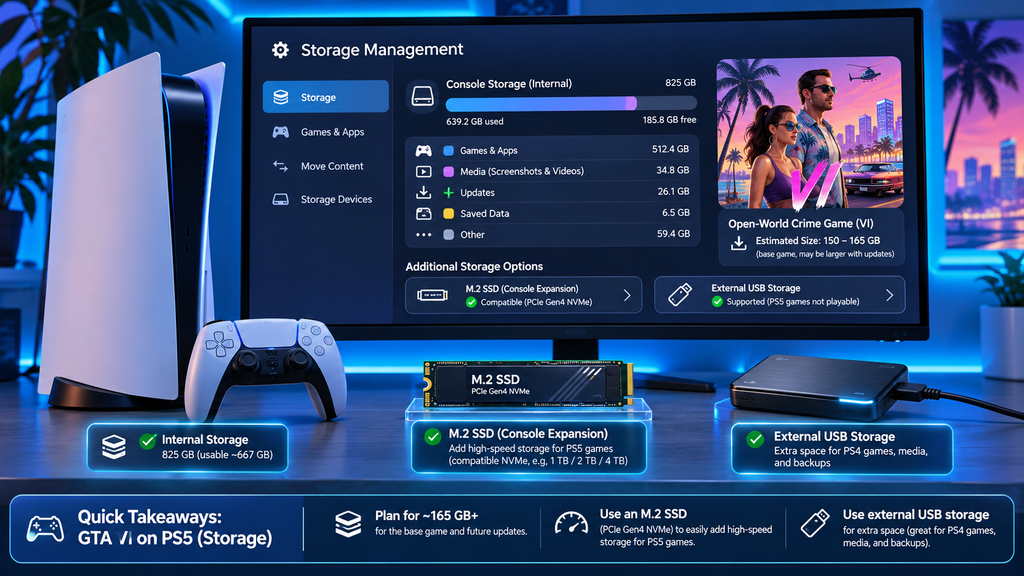
GTA VI requires a very large amount of storage. Around launch, reporting placed the PS5 game at approximately 212 GB, but required free space can change after patches and can differ from the actual transfer size. Always use the latest figure shown on your PS5: Game Library > GTA VI > … (More) > View Product. Compare that figure with Settings > Storage. Leave additional room for updates rather than clearing exactly the stated minimum.
4. Updated PS5 system software
Go to Settings > System > System Software > System Software Update and Settings. Install any available update and restart if requested. Up-to-date software helps prevent compatibility and download problems.
5. A valid purchase or download code
For a digital purchase, make sure your PlayStation Store transaction has completed. For a boxed Code-In-Box copy, keep the supplied voucher code ready. Sony confirms that GTA VI’s physical Code-In-Box edition does not include a game disc. The code gives you access to the digital download.
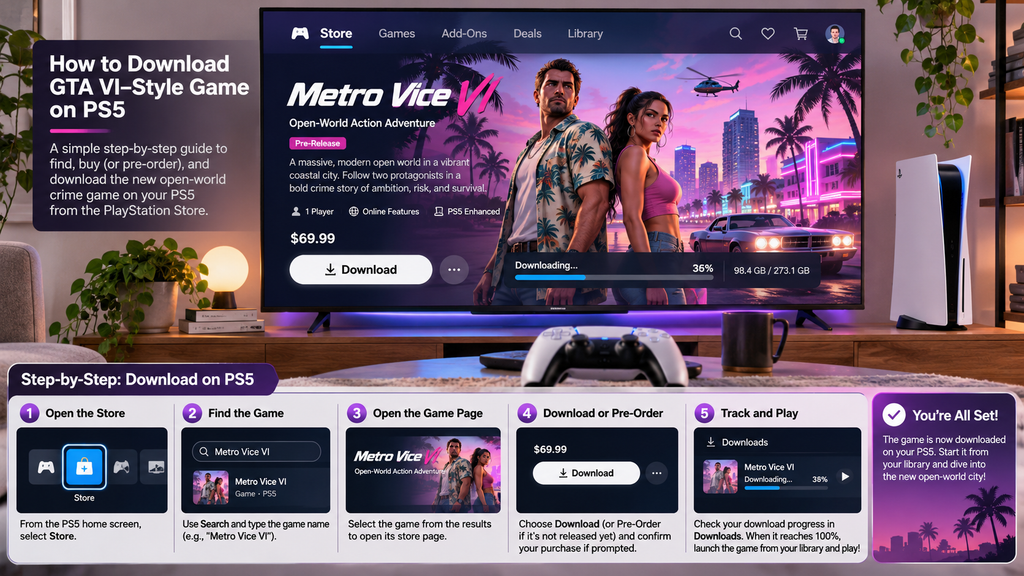
Method 1: Download and Install GTA VI from the PlayStation Store
This is the easiest method if you have not bought the game yet. The on-screen layout may differ slightly between regions or console software versions, but the overall process is the same.
Step 1: Turn on your PS5 and sign in
Switch on the PS5, pick the correct user profile, and confirm that the console is online. If the account has not been signed in to PlayStation Network, follow the on-screen prompts to sign in safely.
Step 2: Open PlayStation Store
From the Games home screen, select the PlayStation Store shopping-bag icon. This is Sony’s official place to buy digital PlayStation games. Do not use random links from social media or search advertisements claiming to be a special GTA VI installer.
Step 3: Search for Grand Theft Auto VI
Choose Search and type Grand Theft Auto VI or GTA 6. Select the official Rockstar Games listing and make sure it says PlayStation 5. Check the edition and contents before you spend money.
Step 4: Choose your edition
Sony lists Standard Edition and Ultimate Edition on its GTA VI support page. Review the PlayStation Store description to see what each edition includes and its current regional price. Extra content is not required just to play the main game. If you already bought Standard Edition, do not buy it again merely because the store shows an Ultimate Edition listing.
Step 5: Purchase the game safely
Select the price or purchase button, confirm your payment method, and complete checkout. You may need a password or additional verification. Once Sony confirms the order, the game is linked to the purchasing account. If the order fails, check your transaction history before attempting another payment.
Step 6: Select Download
After purchase, choose Download on the game page. If you leave the Store, open Game Library > Your Collection, find GTA VI, and select Download there instead. The PS5 will begin downloading the game files and preparing the installation.
Step 7: Watch the download progress
Press the PS button to open the control centre and select Downloads/Uploads. Find GTA VI to see whether the download is progressing or paused. Keep your internet connected. A big game can take a while, and the time shown on screen may change as connection speed changes.
Step 8: Allow installation and updates to finish
The PS5 installs the downloaded data automatically. If it offers a Playable notification before everything is downloaded, remember that some features or content may still be unavailable. For the smoothest first session, wait for the full download and any available update to finish.
Step 9: Launch GTA VI
Return to Games home or Game Library and select the GTA VI tile. Choose Play, follow any first-time setup prompts, and adjust your in-game preferences. If the game asks for an update, let it finish before troubleshooting other issues.
Method 2: Download GTA VI If You Already Purchased It
You do not have to buy GTA VI again just because you deleted it or changed where it is installed. Digital purchases are associated with the PlayStation account that purchased them, subject to the usual licence terms.
1. Sign in to the PlayStation account that owns GTA VI.
2. Open Game Library from the Games home screen.
3. Select Your Collection and find Grand Theft Auto VI.
4. Open the game page and choose Download.
5. Check Downloads/Uploads for progress, then launch the game after installation.
If the game is missing, check the account’s transaction history and any hidden games. If you see a price rather than a Download button, do not immediately pay again: verify you are on the right account and edition first.
Method 3: Install the GTA VI Boxed Code-In-Box Version
This method is important because GTA VI’s PS5 boxed Standard Edition is not a conventional disc installation. PlayStation says the Code-In-Box edition contains a downloadable game code, not a disc. You still need an internet connection and enough storage for the whole game.
1. Open the GTA VI package and find its voucher or download code.
2. Sign in to the correct PlayStation account on the PS5.
3. Open PlayStation Store and choose the Redeem Code option. The exact location may appear under the Store’s menu.
4. Carefully enter the code exactly as printed and confirm redemption.
5. Follow the prompt to download GTA VI, or find it later in Game Library > Your Collection.
6. Keep the console online and let the installation complete.
A code can have region or redemption restrictions. If it reports that it has already been used, verify whether it was redeemed on another account. If it is missing, damaged, or unreadable, contact the retailer, as PlayStation recommends. Never post a photograph of an unused code publicly.
Can You Download GTA VI Through the PlayStation App?
Yes, the PlayStation App can help start downloads remotely when your account and console are correctly linked and remote download settings are enabled. Open the app on your phone, sign in to the account that owns GTA VI, go to Game Library > Purchased, select the game, and choose the option to download to your linked console if it is offered. Your console needs enough space and must be connected to the network in a supported power state. If you cannot see the console, check that it is linked to the same account.
This can be useful when you are away from the TV. It does not turn a phone into a game installer: your PS5 still downloads the data from PlayStation’s service. If the app shows an error, use the PS5 Game Library method instead.
How to Download GTA VI in PS5 Rest Mode
Rest Mode can allow the console to continue downloading while using less power than when fully active. First go to Settings > System > Power Saving > Features Available in Rest Mode, then enable Stay Connected to the Internet. Sony also recommends Settings > Saved Data and Game/App Settings > Automatic Updates > Auto-Install in Rest Mode for relevant automatic installation behaviour.
Start the GTA VI download normally. Press the PS button, go to Power, and select Enter Rest Mode. Do not unplug the console or cut its power. When you return, wake the PS5 and open Downloads/Uploads to check the result. Remember that Rest Mode is not the same as shutting the console down completely.
How Much Storage Space Does GTA VI Need on PS5?
Reports around GTA VI’s launch described a PS5 file size of roughly 212 GB. Treat this as a useful planning estimate, not a permanent exact requirement: updates, edition content, and the distinction between download and installed size can change what you see. Sony provides a more reliable live check on the console: open Game Library, select GTA VI, choose … (More) > View Product, and look for the minimum free space requirement. Then open Settings > Storage to see what is available.
If there is not enough room, delete a game you no longer play: Settings > Storage > Console Storage > Games and Apps, choose an item, then Delete. Deleting a digital game does not automatically take away your licence; you can download purchased games again later. However, be careful to distinguish game installation files from saved data and make a backup of anything important.
Another option is a compatible M.2 SSD installed in the PS5’s expansion slot. Compatible PS5 games can be stored and played from supported internal M.2 SSD storage. A USB extended drive is different: it can store PS5 game data, but you must copy a PS5 game back to console storage or compatible M.2 SSD before playing it. This catches many people who try to run a PS5 title directly from an external hard drive.
How Long Does GTA VI Take to Download?
Download time depends mainly on the actual download size and your real, sustained connection speed. To give a simple illustration, transferring 212 GB at a constant 100 Mbps would take roughly five hours before network overhead, server variation, or installation time. At 50 Mbps it could be around ten hours; at 200 Mbps, roughly two and a half hours. These are illustrations, not promises: a PS5’s speed test may differ from its actual game download rate.
For better results, use Ethernet if possible; stop other large downloads; avoid streaming 4K video on the same busy connection; restart your router if your internet is behaving abnormally; and check whether PlayStation Network is experiencing service problems. Switching between Wi-Fi bands can sometimes help, but a stable connection matters more than an impressive advertised speed.
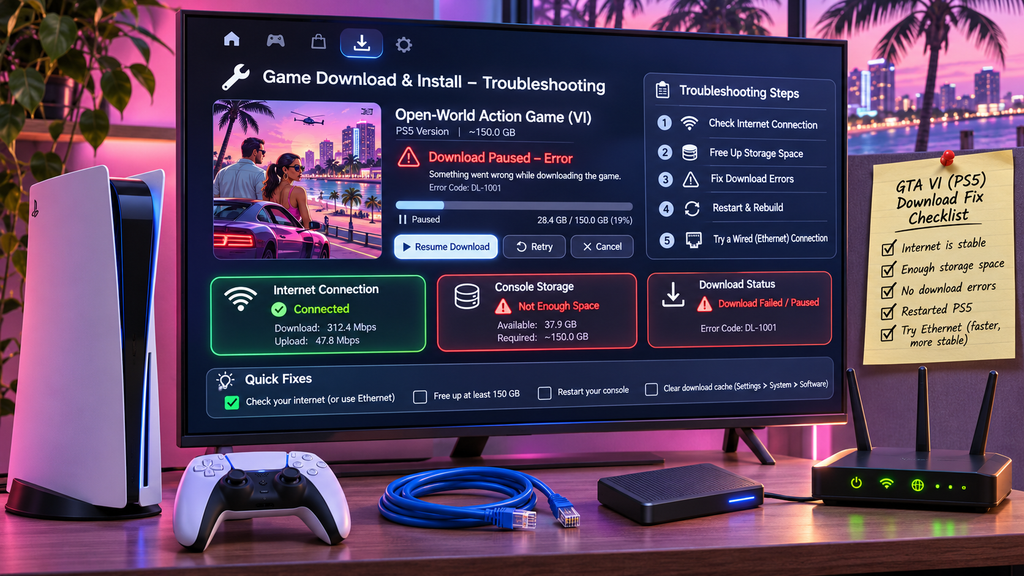
GTA VI Download Stuck or Not Installing? Fixes in Order
Try these checks from top to bottom. They are safer and faster than factory-resetting the console, which is not a sensible first troubleshooting step.
Fix 1: Pause and resume the download
Press the PS button, open Downloads/Uploads, select GTA VI, choose Pause, then Resume. This is one of PlayStation’s recommended first fixes when a download will not start. Give the download a moment to reconnect.
Fix 2: Check PlayStation Network status
Visit status.playstation.com using your phone or another device. A PlayStation Store or network outage can stop downloads even when your own Wi-Fi appears fine. If a service is unavailable, try again when Sony reports that it is working.
Fix 3: Test the PS5’s internet connection
Open Settings > Network > Connection Status > Test Internet Connection. If the console fails the test, reconnect the Wi-Fi or check your Ethernet cable. Restart the router if needed, and make sure another device on the same network can access the internet.
Fix 4: Confirm free storage
Go to Settings > Storage and compare the free capacity with the minimum shown in GTA VI’s View Product screen. Remove or move other installations if required. If you are only a few gigabytes above the minimum, clear additional room for updates and temporary files.
Fix 5: Update your PS5 software
Go to Settings > System > System Software > System Software Update and Settings. Install available updates, restart the PS5, then reopen Game Library. An outdated console can introduce avoidable problems.
Fix 6: Cancel a broken download and try again
If GTA VI is still stuck, open Downloads/Uploads, select its entry, and choose Cancel and Delete. Then open Game Library and choose Download again. Be aware that this may remove already-downloaded progress, so try the less disruptive steps first.
Fix 7: Resolve a padlock or licence problem
If the GTA VI tile has a padlock, first verify the account used to buy or redeem it. Then open Settings > Users and Accounts > Other > Restore Licenses, and restore the relevant licence. Sony says this action does not affect your saved data. If another user on the PS5 owns the game, check whether Console Sharing and Offline Play is enabled on the owning account’s console.
Fix 8: Use advanced troubleshooting only if necessary
PlayStation’s official support guide lists clearing the cache and rebuilding the database from PS5 Safe Mode as a later step. Follow Sony’s current instructions carefully and select the exact non-destructive option. Do not choose Reset PS5 or reinstall system software just to solve an ordinary download problem. If you are unsure, contact PlayStation Support first.
GTA VI Is Not Showing in Your Game Library: What to Check
First, confirm which PlayStation account completed the purchase or redeemed the boxed code. Look at transaction history or email receipts. Next, open Game Library and check for hidden games. If you have multiple editions or add-ons displayed, make sure you are looking at the main PS5 game rather than an extra pack.
If you have verified ownership but still cannot see the game, try restoring licences and signing out and back into your account. If a payment appears unsuccessful or a voucher has a problem, use PlayStation Support and have the order details ready. Do not send your password or a one-time security code to anyone claiming they can unlock GTA VI for you.
GTA VI Downloaded but Will Not Start
An installed game can still fail to launch if an update is waiting, the licence cannot be checked, or system software needs attention. Restart the PS5, connect to the internet, check for a GTA VI update, and verify that you are signed in to the correct account. If you see the padlock symbol, follow the Restore Licenses steps above.
Make sure the game is installed on console storage or a compatible M.2 SSD, not being left on USB extended storage. If crashes continue, note any error code and check Rockstar Support for game-specific bugs or patches. PlayStation Support handles downloading, installation, account issues, and game launch problems; Rockstar Support is the better place for gameplay bugs.
GTA VI Preload: What Happened Before Release?
Rockstar opened GTA VI preloading in November 2026 ahead of the November 19 launch. Preloading meant eligible players could download encrypted game data early; it did not give access to play before release. Since the game has already launched, you should now simply download the purchased game from the PlayStation Store or Game Library. Older articles saying GTA VI is still awaiting its preload date are out of date.
FAQs: Downloading GTA VI on PlayStation 5
Can I download GTA VI directly onto my PS5?
Yes. Buy it from PlayStation Store or download a copy you already own through Game Library > Your Collection. A redeemed Code-In-Box edition also downloads through PlayStation’s digital service.
Is GTA VI free on PS5?
No. GTA VI is a paid game. Check the current price and any legitimate offers on your local PlayStation Store. Avoid suspicious sites offering free installers or account unlocks.
Does the boxed PS5 version have a disc?
No. PlayStation describes the GTA VI PS5 physical Standard Edition as Code-In-Box. Its package contains a download code rather than a game disc. You must redeem the code and download the game.
Do I need PlayStation Plus to download GTA VI?
You do not generally need a PlayStation Plus subscription to buy and download a paid single-player game from the PlayStation Store. Any online modes or subscription requirements should be checked on the current store listing before purchase.
Can I play GTA VI on PS4?
The official release is for PS5 and Xbox Series X|S. Do not confuse PS5 downloads with fake PS4 versions promoted on unofficial websites.
Can I install GTA VI on an external USB hard drive?
You can use compatible USB extended storage to store PS5 game data, but PS5 games must be moved to the console’s internal storage or compatible M.2 SSD to play them.
Can I download GTA VI again after deleting it?
Yes, provided you still have access to the account and licence that owns it. Sign in, open Game Library > Your Collection, and select Download.
Why does GTA VI say Download instead of Play?
The game may not be installed on this PS5, or the installation may be incomplete. Check Downloads/Uploads and storage. If you own the game but see only a purchase button, verify your account and licences.
Can I start playing before the full download finishes?
Some PS5 titles offer a playable portion before the entire download completes, but available functions can be limited. Follow the status shown by GTA VI on your own console; letting the full download and updates finish is safest.
Can I download GTA VI using my phone?
The PlayStation App can start a remote download to a linked PS5 when the relevant settings and connection are in place. The game is still downloaded to the console, not installed on the phone.
How do I fix the GTA VI padlock icon?
Confirm that the account owns the game, then go to Settings > Users and Accounts > Other > Restore Licenses. If another account bought the game, review Console Sharing and Offline Play settings.
What should I do if a GTA VI voucher code does not work?
Double-check its characters, the account, and any region restrictions. If a boxed code is unreadable or missing, contact the retailer. For account or code redemption errors, consult PlayStation Support.
Final Thoughts
To download GTA VI on PS5, the safest route is the official PlayStation Store. Buy the correct edition, select Download, watch progress in Downloads/Uploads, and let the console finish installing the game. If you already own GTA VI, use Game Library instead. If you bought the boxed edition, redeem its download code first because there is no game disc inside.
The two problems most likely to interrupt the process are insufficient storage and a download that stalls. Check the required space inside View Product, use a reliable connection, and try PlayStation’s simple fixes before anything more advanced. Once the installation and updates are complete, you are ready to explore Vice City and the wider state of Leonida.
Official Sources and Further Reading
Rockstar Games: GTA VI now available — https://www.rockstargames.com/newswire/article/39akk424a9oo53/grand-theft-auto-vi-now-available
PlayStation: GTA VI support, editions, boxed code and setup — https://www.playstation.com/en-gb/support/games/gta-vi-support/
PlayStation: How to purchase games from the Store — https://www.playstation.com/en-gb/support/store/purchase-games-apps-ps-store/
PlayStation: Troubleshoot game downloads — https://www.playstation.com/en-gb/support/games/troubleshoot-downloaded-playstation-game/
PlayStation: Restore licences — https://www.playstation.com/en-us/support/games/restore-licences-playstation/
PlayStation: Manage PS5 storage — https://www.playstation.com/en-us/support/hardware/ps5-manage-storage-space/
PlayStation: GTA VI product page — https://www.playstation.com/en-gb/games/grand-theft-auto-vi/