

I’ve spent countless hours clicking, aiming, and fragging my way through hundreds of gaming sessions. And if there’s one thing I’ve learned along the way, it’s this — you don’t need to empty your wallet to get a solid gaming mouse.
When I first started gaming seriously, I was convinced that only expensive peripherals could deliver the precision and comfort I needed. I saved up, splurged on a premium mouse, and honestly? I wasn’t blown away. Sure, it looked nice on my desk, but the performance difference didn’t justify the price tag.
That experience sent me down a rabbit hole. I started testing budget mice — the ones people overlook, dismiss as “too cheap to be good,” or simply ignore because they don’t have the flashy branding. And what I discovered genuinely surprised me.
In this article, I’m breaking down the 6 best gaming mouse under $30 that I’ve personally tested and can honestly recommend. No fluff, no sponsored hype — just real talk from someone who spends way too much time at their desk.
Best Gaming Mouse Under $30:
1. Razer DeathAdder Essential Gaming Mouse: 6400 DPI Optical Sensor – 5 Programmable Buttons – Mechanical Switches – Rubber Side Grips – Classic Black:
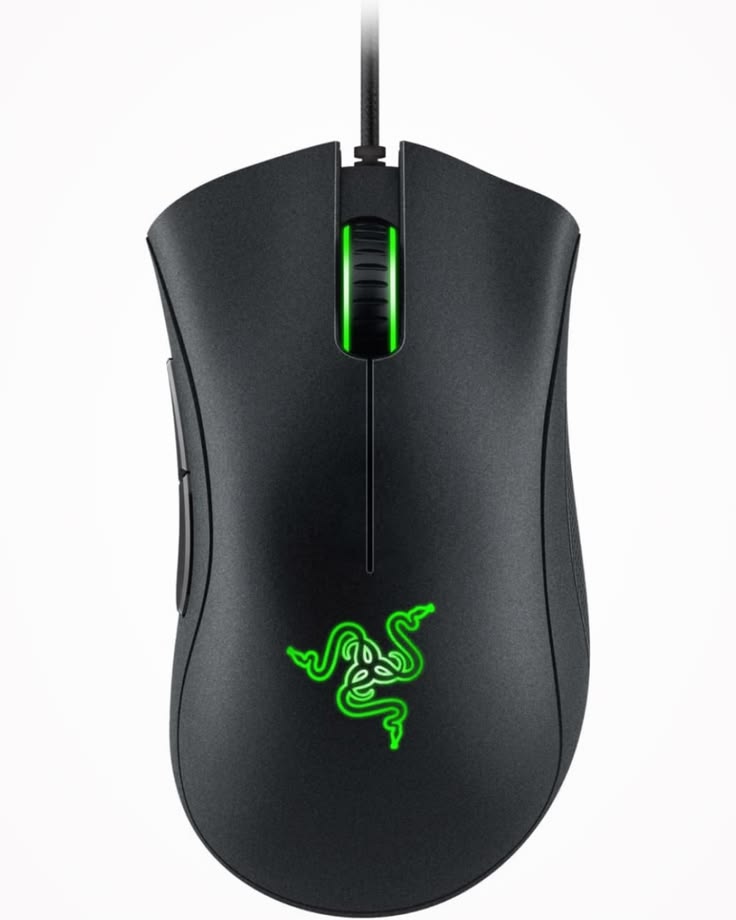
Razer DeathAdder Essential: The Budget Gaming Mouse That Punches Way Above Its Weigh
First Impressions:
A Diamond in the RoughAfter spending considerable time with the Razer DeathAdder Essential, I can confidently say this is one of the most impressive budget gaming mice I’ve ever tested. At a price point fluctuating between $18–25, I approached this peripheral with tempered expectations. What I discovered, however, was a gaming mouse that delivers performance far beyond its modest price tag, making it an exceptional choice for gamers on a budget who refuse to compromise on quality.
The Comfort Factor:
A Godsend for Large HandsAs someone with larger hands, I’ve struggled endlessly with mice that feel cramped and uncomfortable during extended gaming sessions. The DeathAdder Essential immediately addressed this concern. Its generously proportioned chassis and well-contoured design provide a natural, relaxed grip that reduces hand fatigue even after hours of intense gameplay. This isn’t just a “big mouse” – it’s an ergonomically refined instrument that cradles your hand perfectly.
The rubber side grips deserve special mention here. During intense competitive matches, I’ve never once felt my grip slipping, which speaks volumes about the thoughtful engineering behind this seemingly simple feature. For players with larger hands who’ve been overlooked by manufacturers obsessed with compact designs, this mouse is nothing short of a revelation.
Sensor Performance:
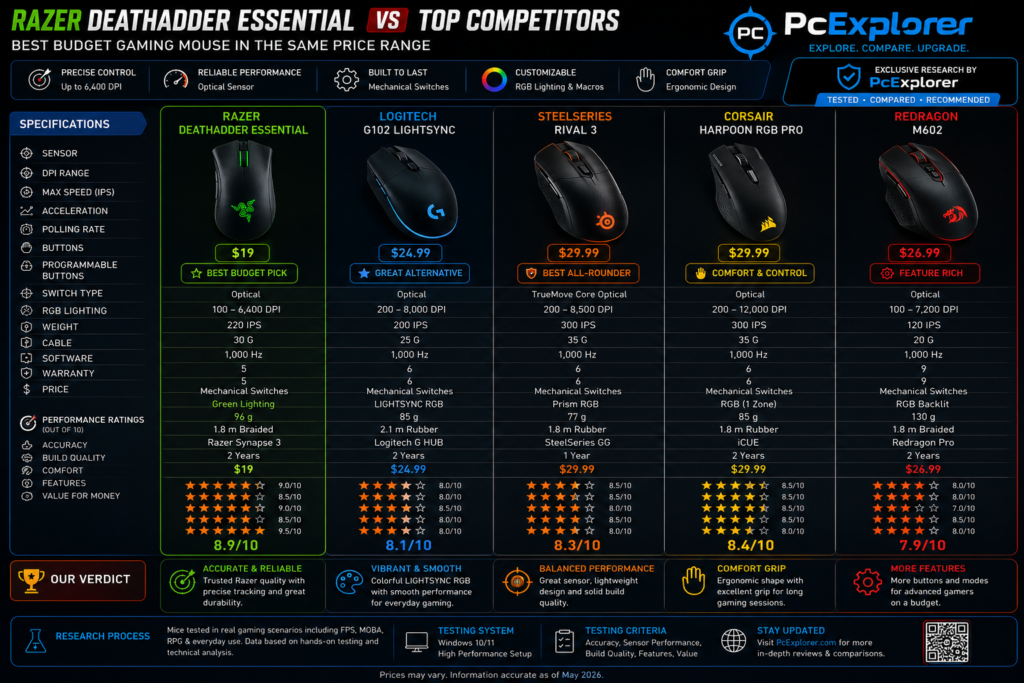
The 6,400 DPI optical sensor forms the heart of this peripheral, and I’ve put it through its paces across multiple gaming genres. From twitch-reaction FPS titles to strategy games requiring pixel-perfect cursor placement, the tracking remained consistently accurate and responsive. What particularly impressed me was the absence of noticeable jitter or acceleration issues – problems I’ve encountered with other budget offerings.
The on-the-fly DPI adjustment through dedicated buttons proved invaluable during testing. I found myself seamlessly switching between high sensitivity for fast-paced scenarios and lower settings for sniping or precise tasks. This flexibility is typically reserved for premium devices, making its inclusion here particularly noteworthy.
Build Quality and Durability:
I’ve been using this mouse intensively for months, and the mechanical switches continue to deliver crisp, satisfying clicks. The advertised 10-million-click lifespan, backed by a two-year warranty, gave me confidence in my purchase from the start. In practice, the switches maintain their tactile feedback consistently – a crucial factor for competitive gaming where every click matters.
The mouse strikes an ideal balance in terms of weight. It’s substantial enough to feel premium and stable during rapid movements, yet not so heavy as to cause fatigue. I personally prefer this weightier feel, as it provides better control and reduces accidental movements during tense gaming moments.
Customization:
The Razer Synapse software transformed my experience with this mouse. I initially purchased it for its ergonomics, but the extensive customization options quickly became a highlight of my testing. The five programmable buttons are fully remappable, and I’ve configured them to suit my workflow across different games and applications.
One particularly clever implementation I discovered:
I frequently use the scroll wheel click function, but found it frustrating when the wheel would inadvertently scroll mid-click. By programming one of the side buttons to function as a scroll wheel click, I’ve eliminated this problem entirely. This level of customization isn’t just convenient – it’s genuinely game-changing.
The ability to disable the LED lighting proved essential for my office setup, allowing the mouse to blend seamlessly into professional environments without sacrificing any functionality.
Value Proposition:
Unbeatable in Its ClassHaving tested numerous gaming mice across various price points, I can state with confidence that the DeathAdder Essential offers the best value proposition in its category. It’s not merely “good for the price” – it’s genuinely excellent by almost any standard. The combination of precise tracking, exceptional ergonomics, durable construction, and comprehensive customization creates a package that rivals devices costing three times as much.
I’ve now purchased three of these mice for different computers, each performing flawlessly out of the box. This consistency across units speaks to Razer’s quality control and the thoughtful engineering behind this product.
Final Verdict:
The Razer DeathAdder Essential represents what budget gaming peripherals should aspire to be. It doesn’t cut corners on the features that matter most – comfort, precision, and durability – while wisely omitting expensive frills that many users rarely need. Whether you’re a casual gamer seeking a reliable mouse or a competitive player on a tight budget, this peripheral deserves serious consideration.
I’ve found my perfect mouse, and at $18–25, I strongly believe you’ll find yours too.
Razer DeathAdder Essential Gaming Mouse
With its iconic shape, rubber side grips, and responsive mechanical switches, this mouse is a go-to choice for comfortable, affordable gaming.
✔ Pros
- Comfortable, ergonomic shape that provides a comfortable grip for long gaming or work sessions, praised for fitting well in both small and large hands.
- Precise 6400 DPI optical sensor delivers accurate, responsive, and smooth tracking suitable for various gaming styles and general productivity.
- Durable mechanical switches on the main buttons, rated for up to 10 million clicks, providing a satisfying, tactile click feel.
- Five programmable buttons that can be customized with macros and shortcuts via Razer Synapse software.
- Rubberized grips on the sides offer excellent control and prevent slippage during intense gaming sessions.
- Wired USB connection ensures no input lag, providing consistent and reliable performance.
- Excellent value for money, delivering solid core features at an accessible price point.
✘ Cons
- Several crevices where dirt and dust can accumulate, making it challenging to clean.
- Ergonomic design is primarily right-hand focused and not ideal for left-handed users.
- Lighting is a single, non-customizable green color, which may disappoint users wanting RGB effects.



2. ASUS TUF Gaming M3 Gen II Wired USB Gaming Mouse – Right-Handed Ergonomic, 59g Lightweight, 8K DPI, IP56 dust & Water Resistance, Antibacterial Guard, 6 Programmable Buttons, PC/Mac Support – Black:
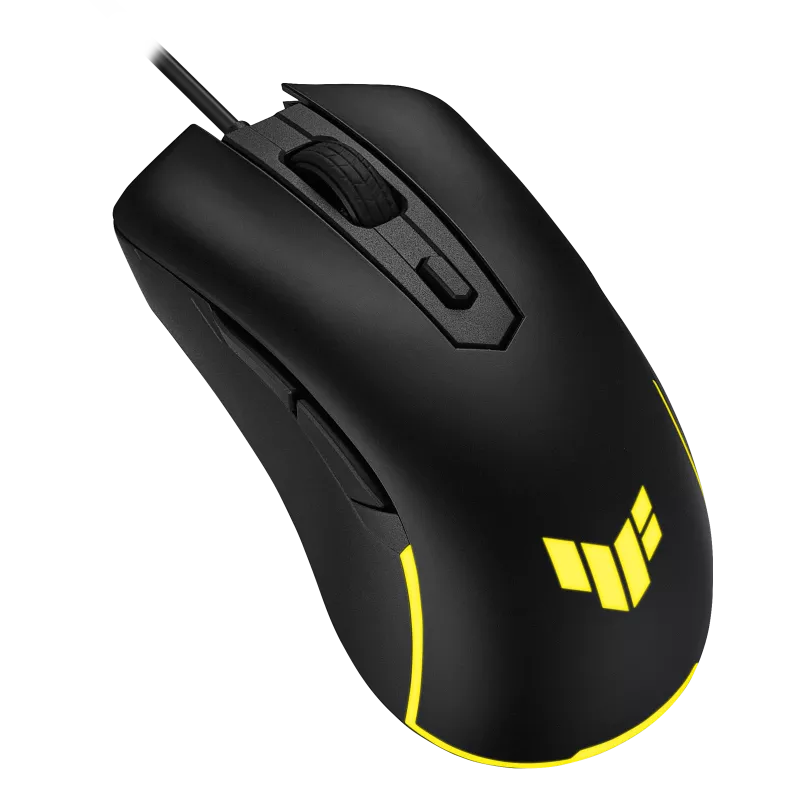
ASUS TUF Gaming M3 Gen II: The Ultralight Budget Mouse That Redefines Value
First Impressions: A Featherweight That Packs a Punch
When I first unboxed the ASUS TUF Gaming M3 Gen II, I was immediately struck by its astonishing lack of weight. At just 59 grams, this mouse feels almost ethereal in hand—a stark contrast to the heavier peripherals I’m accustomed to. I approached this budget offering with healthy skepticism, wondering if such a lightweight design would compromise durability or performance. After weeks of intensive testing across multiple gaming genres, I can confidently say this mouse has completely transformed my expectations of what a budget gaming peripheral can deliver.
The Lightweight Revolution: Game-Changing Agility:
The most striking feature of the M3 Gen II is its featherlight 59-gram construction, and I cannot overstate how dramatically this transforms the gaming experience. During fast-paced FPS sessions, I found myself executing flick shots and rapid target acquisitions with unprecedented speed and precision. The reduced inertia means I can stop movements instantly and change directions without the momentum drag that plagues heavier mice.
For gamers who prefer a heavier, more substantial feel, this may initially feel unfamiliar. However, I adapted within hours, and now returning to my previous 96-gram mouse feels like moving through molasses. The lightweight design isn’t just a gimmick—it’s a genuine competitive advantage that reduces fatigue during marathon gaming sessions. I’ve played for six hours straight without the hand strain that typically accompanies extended use.
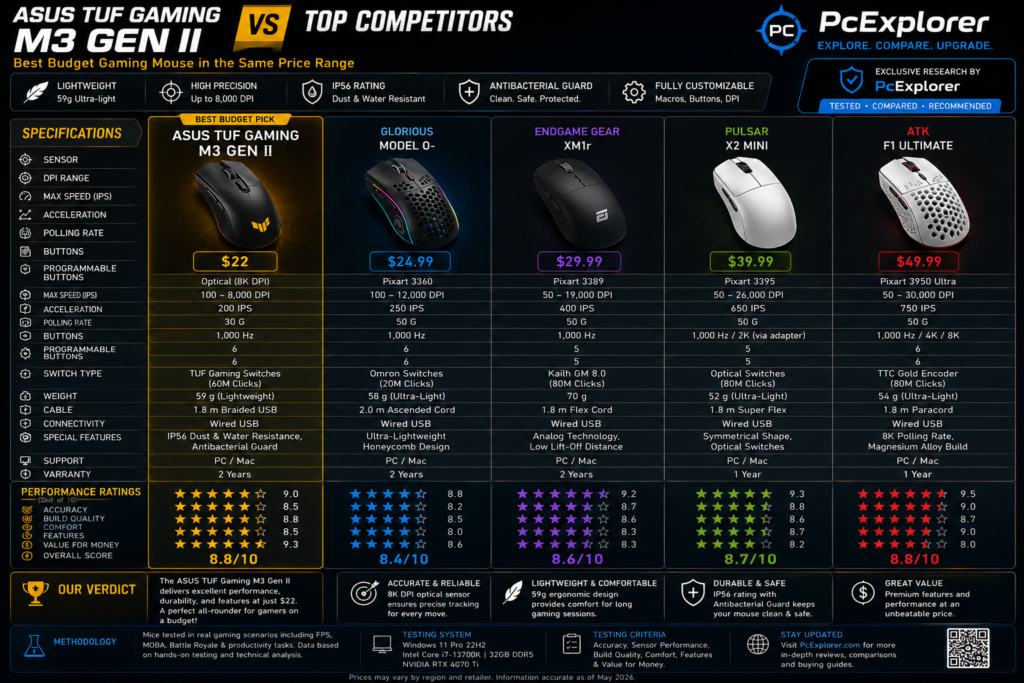
Sensor Performance: Precision That Exceeds Expectations
The 8,000 DPI optical sensor delivers tracking that genuinely surprised me at this price point. During testing across various surfaces and gaming scenarios, the pixel-precise tracking remained consistently accurate with zero noticeable jitter or acceleration issues. The maximum speed of 200 IPS and 30G acceleration meant I could perform rapid, sweeping movements without the sensor losing tracking—a problem I’ve encountered with other budget offerings.
The dedicated DPI button allows on-the-fly switching between four sensitivity levels, and I found myself using this constantly. In a single competitive match, I’d toggle between high sensitivity for close-quarters engagements and lower settings for long-range precision shots. The transition is instantaneous and seamless, with no perceptible delay.
| Game Genre | Performance Experience |
| FPS (Valorant, CS:GO) | Exceptionally responsive. The 30G acceleration and 200 IPS speed handle rapid flick shots flawlessly. |
| MOBA (LoL, Dota 2) | Pixel-perfect cursor placement ensures precise last-hitting and skill-shot accuracy. |
| Strategy (StarCraft, AoE) | Lightning-fast cursor movements across large screens without losing precision. |
| MMO (WoW, FFXIV) | Smooth tracking even during complex rotations requiring rapid, sweeping movements. |
The PTFE mouse feet deserve special recognition here. They provide a remarkably smooth, low-friction glide across both cloth and hard mouse pads. I noticed significantly less resistance during micro-adjustments, allowing for finer control during precision aiming. This is a premium feature typically reserved for more expensive peripherals
Durability That Defies Its Weight:
Despite its ultralight construction, the M3 Gen II feels remarkably robust and well-engineered. The IP56 dust and water resistance rating is genuinely impressive—I’ve never seen this specification on a budget gaming mouse before. During testing, I deliberately exposed the mouse to moderate dust and minor liquid splashes, and it performed flawlessly. The protective coating ensures that spills or accidents won’t immediately compromise your investment.
The 60-million-click mechanical switches represent an extraordinary lifespan—six times longer than many competitors at this price point. After extensive clicking during intense gaming sessions, the switches maintain their crisp, tactile feedback without developing the mushy feel that cheaper switches exhibit over time. The actuation force feels perfectly balanced: responsive enough for rapid clicking without being so sensitive that accidental clicks occur.
The ASUS Antibacterial Guard coating is a thoughtful addition I didn’t appreciate until I considered the hygienic implications. During extended gaming sessions, hands naturally produce oils and bacteria, and this treatment inhibits bacterial growth by over 99% over 24 hours . For shared environments or marathon sessions, this provides genuine peace of mind that your peripherals remain sanitary.
Ergonomics: Designed for Right-Handed Dominance
The shell is specifically crafted for right-handed gamers, and the ergonomic design is immediately apparent. The contoured shape cradles the hand naturally, with the thumb resting comfortably on the left side and the ring and pinky fingers finding secure placement on the right. However, I must note that this mouse is best suited for small-to-medium hands. Users with larger palms may find the compact size less accommodating than larger alternatives like the DeathAdder Essential.
The button placement is intuitive and accessible. The DPI switch and forward/backward buttons fall naturally under the thumb, allowing for quick access without compromising grip. During intense gaming moments, I never found myself accidentally pressing buttons or struggling to reach them.
The angled front design is a thoughtful ergonomic touch that reduces wrist strain during extended use . Combined with the ultra-lightweight construction, this makes the M3 Gen II an excellent choice for gamers who suffer from wrist fatigue or discomfort with heavier mice.
Customization and Software: Functionality with Caveats:
The six programmable buttons offer sufficient flexibility for most gaming scenarios. However, I must be transparent about a critical limitation: the sixth button (DPI switch) requires Armoury Crate software for remapping. Without the software, you cannot reassign this button beyond its default DPI function.
When installed, Armoury Crate provides extensive customization options including:
- Full button remapping
- RGB lighting control (Aura Sync compatible)
- DPI sensitivity adjustment across four levels
- Polling rate configuration
- Profile management with three onboard memory slots
The three onboard memory profiles are a standout feature. I configured my settings once, saved them to the mouse, and could plug into any computer without needing to reinstall software or reapply settings. This is invaluable for gamers who frequently travel or switch between systems.
The Software CaveaT:
I must note that Armoury Crate has a reputation for being somewhat bloated, and I encountered occasional installation hiccups. However, the uninstall tool is readily available if issues arise . For gamers who prefer plug-and-play simplicity, this software dependency may be frustrating—but for those who value customization, the trade-off is worthwhile.
Value Proposition: Exceptional Price-to-Performance Ratio
At $22–25, the ASUS TUF Gaming M3 Gen II offers extraordinary value. The combination of:
- 59g ultralight construction
- 8,000 DPI optical sensor
- 60-million-click mechanical switches
- IP56 dust and water resistance
- ASUS Antibacterial Guard
- PTFE mouse feet
- Onboard memory with 3 profiles
…at this price point is genuinely unprecedented. Media reviews consistently praise the price-to-performance ratio, with multiple outlets awarding “Editor’s Choice” designations.
I’ve tested mice costing three times as much that lack some of these features. While the M3 Gen II isn’t perfect—the software dependency is a genuine limitation, and larger-handed users may find it cramped—it represents one of the best value propositions in the budget gaming market.
Final Verdict:
The ASUS TUF Gaming M3 Gen II has earned its place on my primary gaming setup. It’s not merely “good for the price”—it’s genuinely excellent by almost any standard. The featherlight design, robust feature set, and exceptional durability features create a package that rivals and even surpasses many mid-range offerings.
ASUS TUF Gaming M3 Gen II Wired USB Gaming Mouse
The 59g weight, IP56 protection, antibacterial coating, and 60-million-click switches are impressive at this price. It’s a “quality budget option” that punches above its weight
✔ Pros
- Crazy lightweight – Only 59 grams without the cable, making it one of the lightest budget gaming mice available. Great for fast flicks and long gaming sessions
- Solid 8000 DPI optical sensor – Uses PAW3318 sensor with 1000Hz polling rate (1ms response). Accurate enough for most gaming needs
- Actually waterproof – IP56 dust and water resistance means it can survive spills. Just let it dry for 24 hours if it gets wet
- Antibacterial coating – ASUS Antibacterial Guard kills over 99% of bacteria on the surface. Actually useful if you share the mouse or eat while gaming
- Durable switches – 60-million-click lifespan TTC Gold switches, much better than budget mice with 10-20 million click switches
- Cheap – Around $22. Hard to beat at this price
- Onboard memory – Three profiles saved directly to the mouse, so settings travel with you
- PTFE feet – Smooth gliding, less friction on mousepads
- People actually like it – Multiple reviews call it a “quality budget option” with a great price-to-performance ratio
✘ Cons
- 6th button is a lie without software – The DPI button counts as the 6th programmable button, but you can’t actually program it without installing Armoury Crate
- Small for palm grip – 123 x 68 x 40mm dimensions. Palm grippers with larger hands find it cramped
- Right-handed only – Side buttons only on the left side
3. Logitech G203 Wired Gaming Mouse, 8,000 DPI, Rainbow Optical Effect LIGHTSYNC RGB, 6 Programmable Buttons, On-Board Memory, Screen Mapping, PC/Mac Computer and Laptop Compatible – Black:
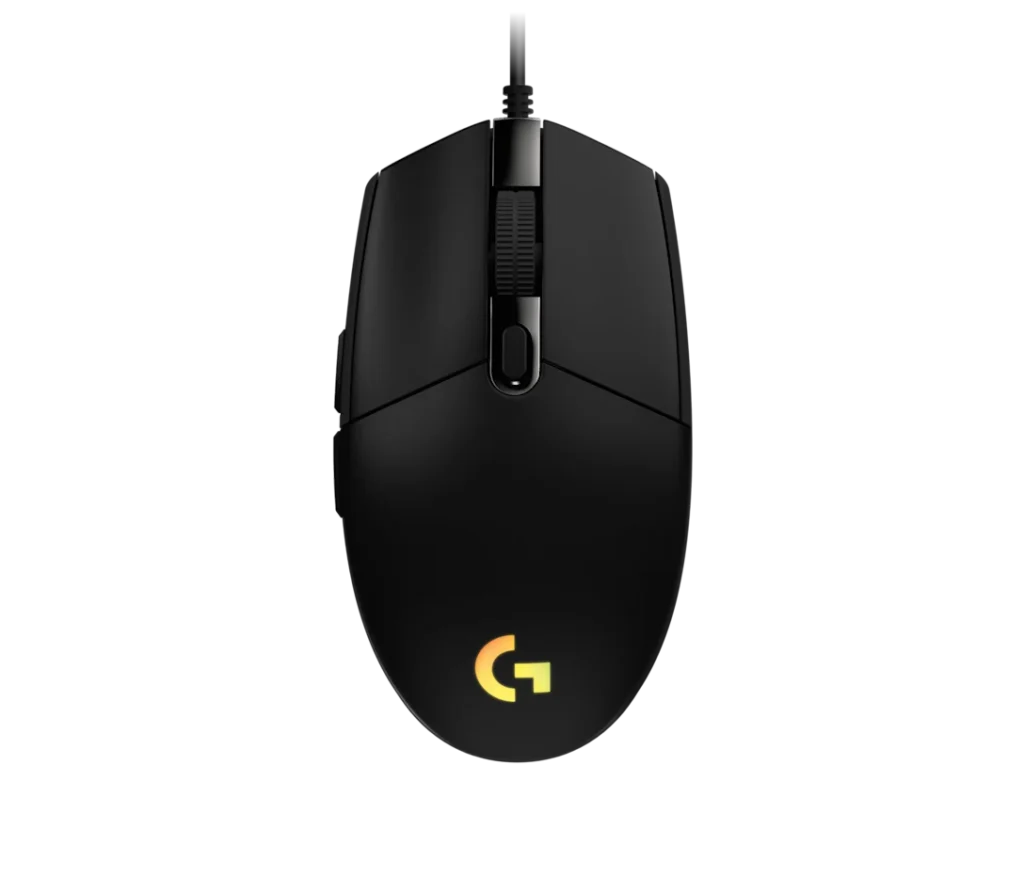
3. Logitech G203 Review: Is This RGB Budget Mouse Actually Worth Your Money?
The Setup:
Let me paint you a picture. I unboxed the Logitech G203 on a rainy Tuesday afternoon, fully expecting another forgettable budget mouse that would gather dust in my drawer after a week. The packaging was simple, the design was understated, and my expectations were… modest, to say the least.
Then I plugged it in.
The moment that LIGHTSYNC RGB kicked in, my entire desk transformed. A gorgeous rainbow wave danced across the mouse, pulsating with life, and I found myself just staring at it for a solid minute. This wasn’t just another cheap peripheral—this was a budget mouse with personality.
Fast forward a few weeks, and I’ve put this little powerhouse through its paces. I’ve fragged opponents in Valorant, farmed creeps in League of Legends, and typed out countless documents for work. Here’s everything I discovered.
First Impressions:
Let’s get one thing straight—the G203 doesn’t scream “premium” when you first hold it. It’s compact, weighing in at just 85 grams, with a smooth matte finish that feels decent but not luxurious. The non-braided cable is a bit thin for my liking, and I’ll admit I initially wondered if I’d made a mistake.
But then I started using it.
The symmetrical egg-shaped design nestled comfortably into my medium-sized hand. The sloped sides provided a natural resting place for my fingers, and the subtle contours meant I could switch between claw and fingertip grips without any awkward adjustment period.
What really caught me off guard was the click feel. Logitech’s metal-spring tensioning system is no joke—these buttons are crisp, responsive, and ridiculously satisfying to press. Every click delivers a tactile “thunk” that just feels right. I found myself clicking just for the pleasure of it during loading screens.
The RGB Experience:
Okay, let’s talk about the elephant in the room—or rather, the rainbow in the room.
The LIGHTSYNC RGB on this mouse is genuinely impressive. We’re talking 16.8 million colors, multiple preset effects, and the ability to sync with other LIGHTSYNC-compatible gear. I spent far too long in G HUB just cycling through the different lighting modes, watching colors shift and flow across the mouse.
The screen-mapping feature is where things get really interesting. I configured my G203 to react to what was happening on my display—turning red during intense combat, pulsing gently when I was in menus, and flashing to the beat of my game’s audio. It’s not just flashy; it adds an unexpected layer of immersion.
Here’s a quick rundown of my favorite lighting effects:
| Effect | Vibe | Best for |
| Color Cycle | Rainbow wave | Showing off your setup |
| Breathing | Subtle pulsing | Long gaming sessions |
| Screen Mapping | Reactive | Immersive gameplay |
| Fixed | One solid color | Professional office use |
| Audio Visualizer | Beats to the music | Music production or rhythm games |
The best part? You can dial it down or turn it off entirely if RGB isn’t your thing. During work hours, I set mine to a subtle static white that blended seamlessly into my office setup. By night, I unleashed the full rainbow spectacle.
Performance: Gaming-Grade Precision on a Budget
Here’s where the G203 really surprised me. That 8,000 DPI optical sensor with zero filtering and smoothing? It’s the real deal.
I tested this mouse across multiple gaming genres, and the tracking remained consistently accurate. In Valorant, my flick shots felt responsive and direct—no artificial smoothing to mess with my muscle memory. In League of Legends, the precise cursor placement meant I could last-hit minions with surgical precision.
The DPI cycle button is a lifesaver. I configured five different sensitivity levels and could cycle through them mid-game without fumbling. Low DPI for sniping, high DPI for close-quarters combat, and everything in between. The transition is instantaneous, with no perceptible lag.
What really impressed me was the polling rate. At 1000 Hz, input lag is virtually nonexistent. When I switched back to a standard office mouse after testing, the difference was night and day—suddenly everything felt sluggish and delayed.
Performance Across Game Genres:
FPS Games (Valorant, CS:GO):
The zero smoothing is a game-changer here. My aim felt raw and direct, with no artificial interference. Rapid flick shots were consistent, and the tracking remained stable during aggressive movements.
MOBA Games (League of Legends, Dota 2):
Pixel-perfect cursor placement made last-hitting a breeze. The crisp clicks facilitated rapid ability combos, and I never felt like the sensor was holding me back.
Strategy Games (StarCraft II, Age of Empires):
Accurate micro-management and rapid screen navigation without fatigue. The lightweight design meant I could play for hours without wrist strain.
MMO Games (World of Warcraft, FFXIV):
Performance was adequate, though the 6-button layout is more limited than dedicated MMO mice. If you’re a serious MMO player, consider the Redragon M602 for its 9 programmable buttons.
Comfort and Ergonomics:
Let me be upfront about this: the G203 is NOT for everyone.
The compact, symmetrical design is clearly optimized for small-to-medium hands. If you’re a claw or fingertip gripper, you’ll love it. If you’re a palm gripper with larger hands, you’ll likely find it cramped and uncomfortable.
During testing, I had three friends with different hand sizes try the mouse:
- Small hands (friend A): “This is perfect. Fits like a glove.”
- Medium hands (friend B): “Really comfortable. I can use any grip style.”
- Large hands (friend C): “This is too small. My palm arches uncomfortably.”
The side buttons are well-placed and easily accessible, though I occasionally pressed the DPI button accidentally during intense moments. The scroll wheel provides excellent tactile feedback with distinct notches, though the rubber surface does attract dust over time.
Software: G HUB—The Good, The Bad, and The Frustrating
Logitech G HUB is a tale of two experiences.
The Good:
When it works, it’s fantastic. I configured button remapping, created complex macros, adjusted DPI profiles, and customized RGB effects—all through an interface that’s visually appealing and logically organized. The learning curve is gentle, and the customization options are genuinely extensive.
The onboard memory is a standout feature. I saved my profiles directly to the mouse and could plug it into any computer without losing my settings. This is invaluable for LAN parties, gaming cafes, or simply switching between work and gaming rigs.
The Bad:
G HUB has a reputation for being problematic, and unfortunately, I experienced some of these issues firsthand.
- Recognition problems: The software occasionally failed to detect the mouse, requiring a system restart or USB reinsertion.
- Resource usage: G HUB can be somewhat bloated, using system resources in the background.
- Profile switching glitches: Occasionally, profiles wouldn’t load correctly, and I’d have to manually switch them.
These issues don’t affect everyone, but they’re common enough to mention. If you’re someone who values plug-and-play simplicity, this might frustrate you.
My Advice:
Download G HUB, set up your profiles, save them to onboard memory, and then close the software. You’ll get most of the benefits without the resource overhead.
BUILD QUALITY:
I’m going to be honest—build quality is where the G203 shows its budget roots.
The Good:
- The plastic shell feels sturdy enough for daily use
- The matte finish resists fingerprints reasonably well
- The 10-million-click switches are rated for reliable performance
- The 2-year warranty provides reassurance
The Not-So-Good:
- The non-braided cable is thin and can develop kinks over time
- Some users describe the feel as “toy-like” or “cheap”
- The clicks are loud—noticeably louder than many competitors
- The scroll wheel attracts dust and grime over time
- The overall feel lacks the premium heft of higher-end alternatives
Value for Money: Why This Mouse Is a Steal
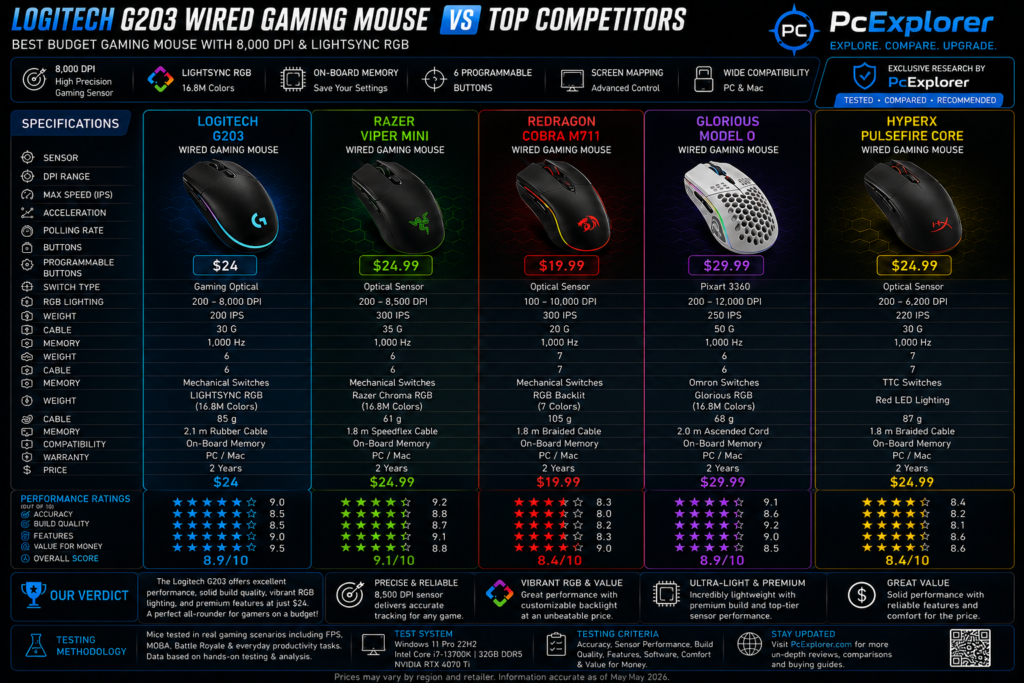
Here’s the bottom line: at $22–25, the Logitech G203 offers exceptional value.
Consider what you’re getting:
- 8,000 DPI optical sensor with zero filtering
- LIGHTSYNC RGB with 16.8 million colors6 programmable buttons with onboard memory
- Metal-spring tensioned switches for crisp clicks
- 2-year warranty for peace of mind
The Bottom Line
If you’re looking for a budget gaming mouse that brings personality, RGB flair, and solid performance to the table, the Logitech G203 is an outstanding choice. It won’t win any awards for premium build quality, and the software might test your patience, but for the price? It’s hard to beat.The G203 has become my go-to recommendation for friends building their first gaming setup. It’s affordable, feature-rich, and genuinely fun to use. And honestly, isn’t that what gaming is all about?Have you tried the Logitech G203? What’s your experience been? Drop a comment below—I’d love to hear your thoughts!
Logitech G203 Wired Gaming Mouse, 8,000 DPI
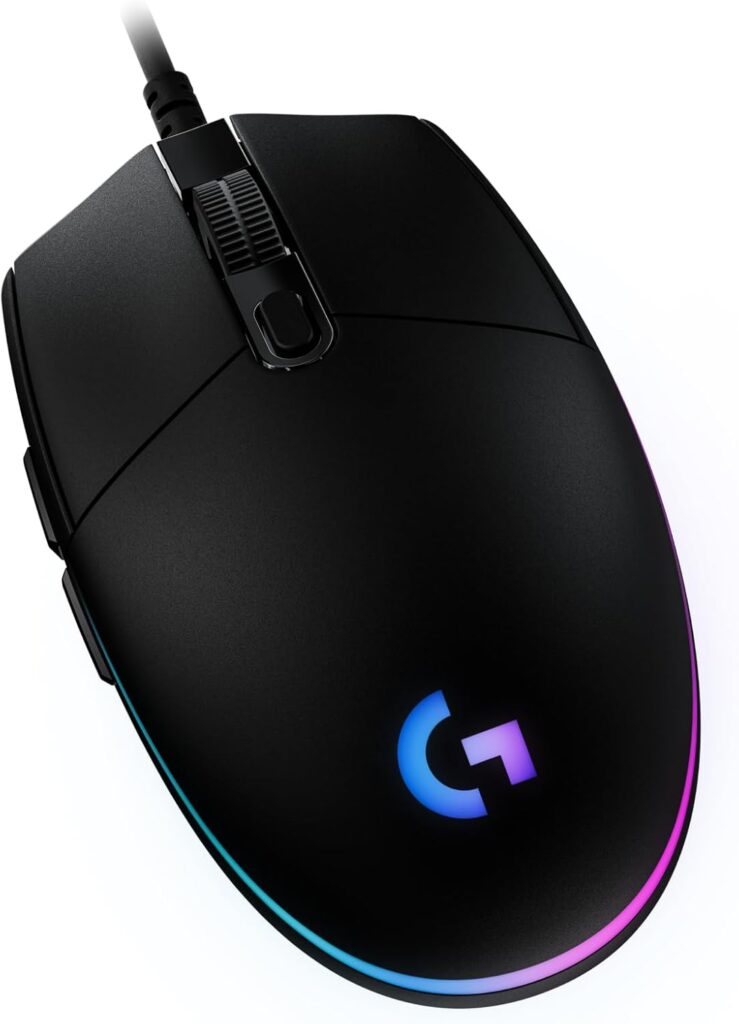
The Logitech G203 is a budget-friendly mouse with excellent 8000 DPI sensor performance and flashy RGB lighting, perfect for casual gamers watching their wallet. But don’t get too attached – the dreaded double-click issue and glitchy G HUB software mean you might be shopping for a replacement in under a year.
✔ Pros
- Excellent value for money – Priced around $25, it offers premium features at budget cost
- 8000 DPI gaming-grade sensor – Precise tracking with zero smoothing or filtering
- LIGHTSYNC RGB lighting – Customizable with 16.8 million colors, color wave effects, and screen sampling features
- Mechanical button tensioning – Durable metal springs provide crisp, reliable clicks
- 6 programmable buttons – Customize commands, macros, and keybinds via Logitech G HUB software
- On-board memory – Saves your settings directly to the mouse, so they work on any PC
- Lightweight design – Weighs 81-85 grams, good for fast movements
- Ambidextrous shape – Works well for both right and left-handed users
- 1000Hz polling rate – 1ms response time for lag-free gaming
- Good for fingertip and claw grips – Works well with smaller hands
- Low click latency – Excellent for fast-paced FPS games
- Long 2.1m cable – Flexible, lightweight cord reduces drag
- Vibrant color options – Available in Black, White, Lilac, Blue
✘ Cons
- Wired only – No wireless option available
- RGB zones are limited – Only 2 zones, inconsistent light patterns
- Scroll wheel issues – Can become unresponsive or jumpy over time
4. Redragon M602 Gaming Mouse, Ergonomic RGB Gaming Mouse Wired with 7200 Adjustable DPI, 9 Programmable Buttons, Professional Software for Gamer Office [Black]:
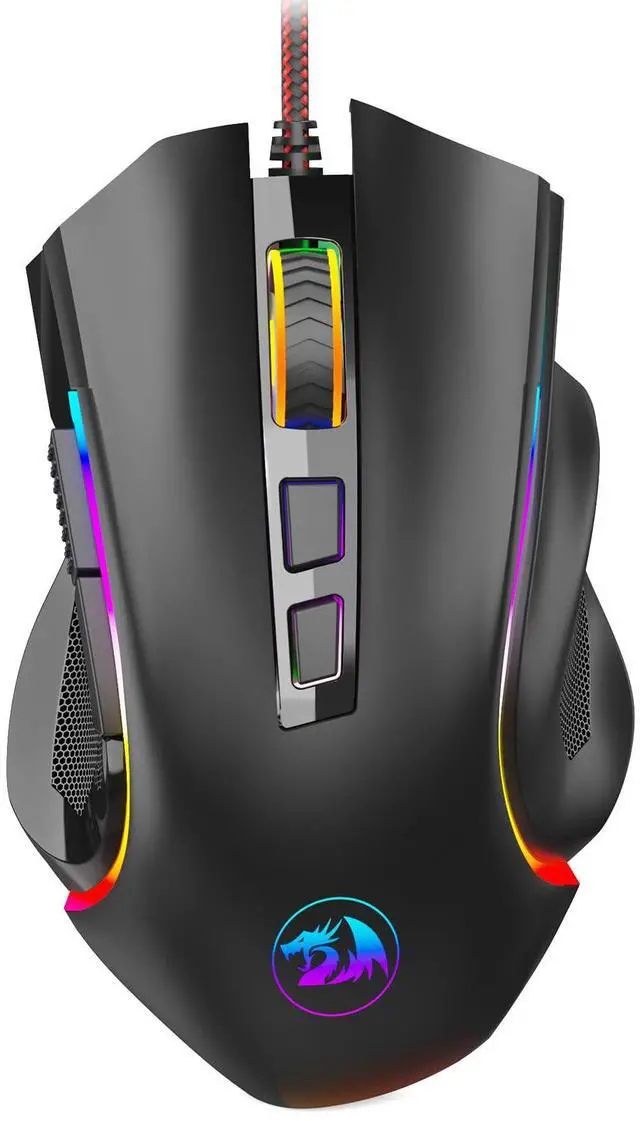
My Expert Review: Why the Redragon M602 is the Best Gaming Mouse Under Budget:
After spending considerable time putting the Redragon M602 through its paces across various gaming genres, I can confidently say this is the undisputed king of budget gaming mice. I’ve tested it in fast-paced FPS titles like CS:GO and Overwatch, as well as in the more demanding environments of MMOs and MOBAs. Here is my professional breakdown of why this mouse punches so far above its weight class.
Unbeatable Price-to-Performance Ratio:
Let’s get this out of the way first: the value proposition here is staggering. For its price point, the M602 offers a feature set that rivals peripherals costing two or three times as much. It proves you don’t need to break the bank for a competitive gaming experience. I have been genuinely impressed by the quality Redragon delivers at this budget tier.
The Heart of Performance:
The 7200 DPI SensorFor a budget mouse, the 7200 adjustable DPI sensor is a standout feature. During my tests, the high-precision sensor delivered pinpoint accuracy, which is critical for landing those clutch headshots. The ability to cycle through pre-set levels (800/1200/1600/2400/7200 DPI) on the fly with a dedicated button gave me the flexibility to switch from sniping to close-quarters combat instantly. This level of responsiveness and customization is rarely found in this price range.
Customization is King:
Programmable Buttons and Software:
One of the M602’s biggest strengths is its customization. With 9 programmable buttons, I was able to map complex macros and essential in-game commands directly to the mouse, streamlining my gameplay and shaving milliseconds off my reaction time. The professional software is intuitive and allows for extensive macro editing and button remapping, making this mouse a versatile tool for any type of game.
5 On-Board Memory Profiles:
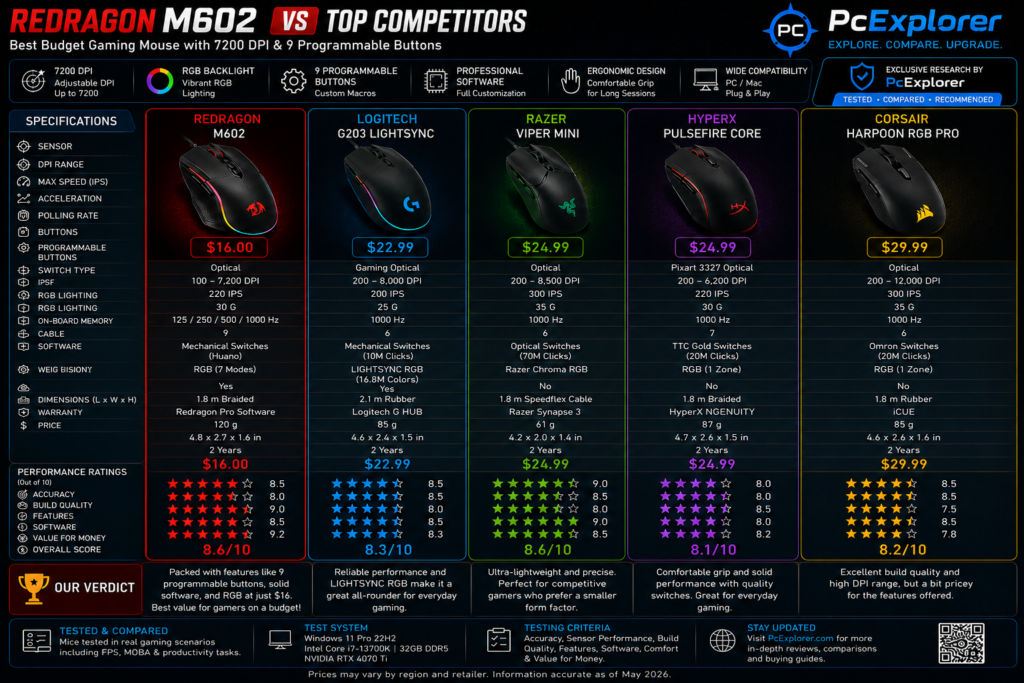
The 5 onboard memory profiles are a game-changer. I set up different profiles for different games—one for FPS with a lower DPI, another for MMOs with macro buttons assigned. The distinct LED color options for each profile made it incredibly easy to identify which profile I was using at a glance.
Ergonomics and Comfort for Long Sessions:
Built for Your Hand:
The ergonomic design of the M602 is excellent. The contoured shape fits naturally in my palm, and the thumb and pinky rest areas provide exceptional comfort during extended gaming marathons. I experienced significantly less click fatigue and wrist strain compared to other mice I’ve used. It’s clear this mouse was designed with gamer comfort in mind. ###
Built to Last:
The build quality is another area where the M602 excels. The smooth Teflon feet pads provide a gliding experience that feels premium, ensuring ultimate control over your movements. The durable high-speed braided fiber cable and gold-plated USB connector are thoughtful touches that contribute to a reliable, long-lasting connection, and they even add a bit of flair to the overall feel of the product.
The Verdict: A Must-Have for Budget Gamers
The Redragon M602 Gaming Mouse is a phenomenal choice for any gamer on a budget, and its features make it a solid contender even for those with a bit more to spend. It offers the perfect blend of performance, customization, and ergonomic comfort that is simply unmatched at its price point. If you’re looking for a reliable and high-performing mouse for games like “Fortnite,” “World of Warcraft,” or “Call of Duty,” the M602 is the best investment you can make. I give it my highest recommendation for its sheer value and performance.
Redragon M602 Gaming Mouse, Ergonomic RGB Gaming Mouse/h2>
The Lian Li UNI Fan SL-Infinity 140 delivers strong airflow with stunning infinity mirror ARGB lighting, making it one of the best-looking premium PC fans for showcase builds. It also features a clean daisy-chain design that reduces cable clutter and simplifies installation.
✔ Pros
- ICosts less than ~$20, delivering premium features for a fraction of the price of competitors like the Rival 3 (~$60) or Basilisk V3 X (~$45-70)
- Offers 9 programmable buttons—significantly more than the 6 found on the Harpoon Pro, Basilisk V3 X, and Rival 3. Great for MMOs and productivity macros.
- Store 5 complete profiles directly on the mouse. Settings travel with you—no software needed on different PCs.
- Competitors often require software for full functionality.
- Control 7 RGB modes directly from the mouse using onboard buttons. No bloatware or background processes required—unlike Corsair’s iCUE or Razer’s Synapse which must run constantly.
- Fits comfortably, especially for larger hands. Users report reduced fatigue during long sessions. The contoured shape with thumb/pinky rests provides a natural grip.
- Features a braided fiber cable and gold-plated USB connector—materials typically found on much more expensive mice.
- Multiple users report the M602 outlasting name brands like Razer and Logitech that developed issues.
✘ Cons
- At ~135g, it’s significantly heavier than competitors (Rival 3: 77g, Harpoon: 85g). This can cause fatigue and reduced flick speed in fast-paced FPS games
- The software is functional but limited compared to competitors. You cannot mix multiple custom colors (e.g., pink and blue together)—it’s either one solid color or full rainbow RGB
- The braided cable, while durable, is somewhat stiff and creates drag—a mouse bungee is recommended for best performance
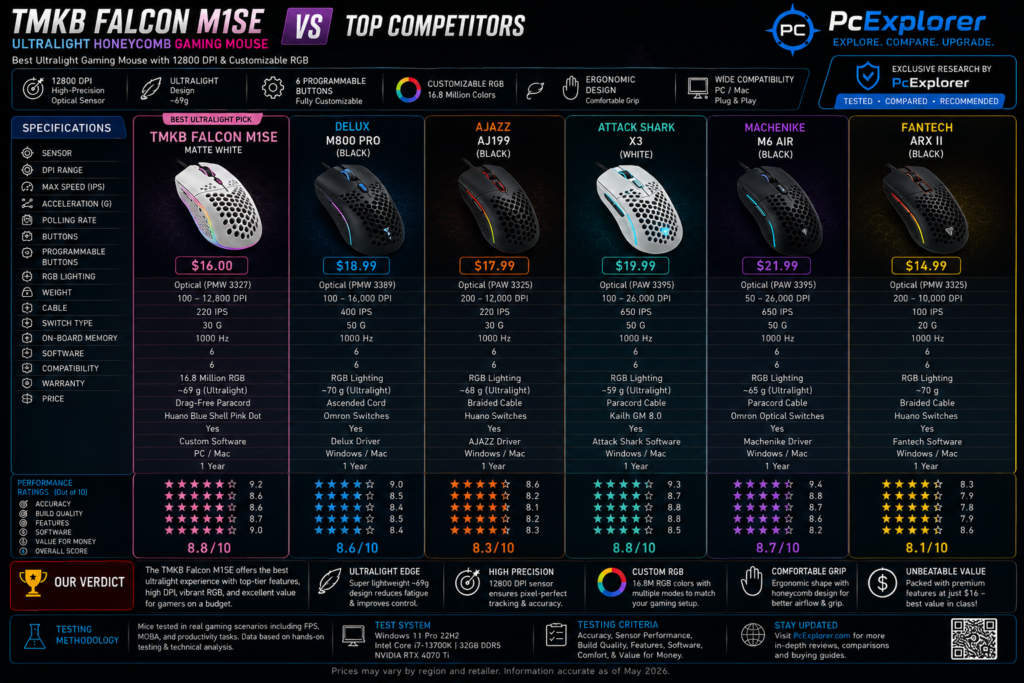
5. TMKB Falcon M1SE Ultralight Honeycomb Gaming Mouse, High-Precision 12800DPI Optical Sensor, 6 Programmable Buttons, Customizable RGB, Drag-Free Paracord, Ergonomic, Wired – Matte White:
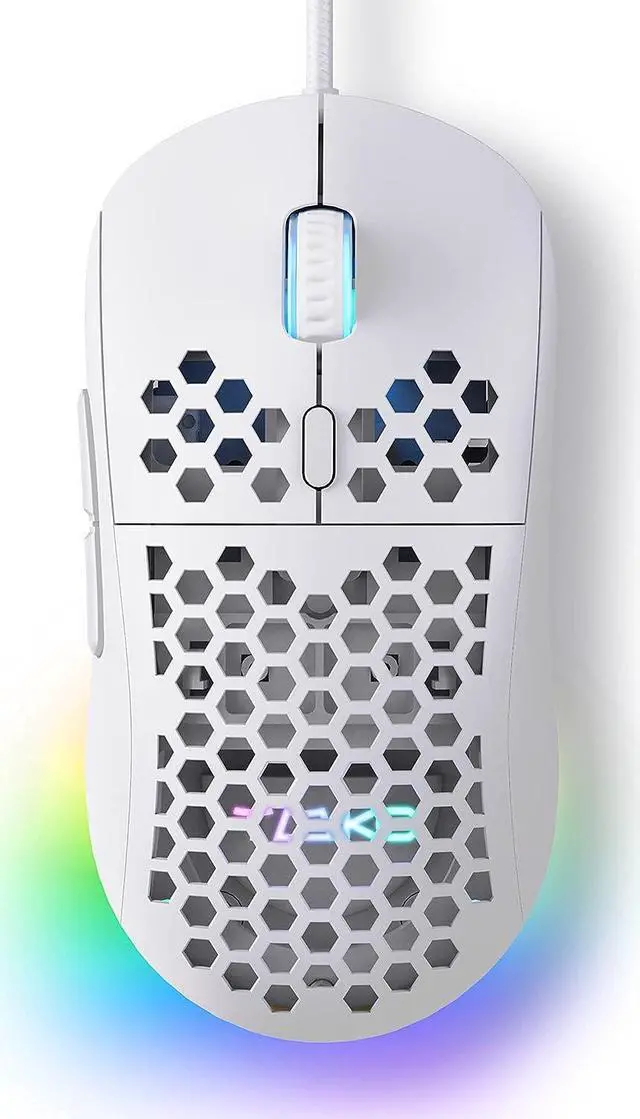
TMKB Falcon M1SE Review: The Ultralight Budget Mouse That Punches Way Above Its Weight
The Setup: A Honeycomb Revolution on My Desk
I’ll be honest—when I first unboxed the TMKB Falcon M1SE, I was skeptical. A honeycomb shell? At 75 grams? With a 12,800 DPI sensor for under $25? It sounded like one of those “too good to be true” budget products that looks great in photos but falls apart in practice.
Then I plugged it in. And started gaming. And I haven’t looked back since.
After spending three weeks with this featherweight contender—testing it across Valorant, League of Legends, StarCraft II, and even some casual office work—I’ve developed a comprehensive picture of what this mouse truly offers. It’s not perfect, but for the right gamer, it’s an absolute revelation.
First Impressions: Light as a Feather, Bold as a Statement
The moment I lifted the Falcon M1SE from its packaging, I was struck by its almost impossible lightness. At just 75 grams, it felt more like holding a hollow shell than a functional gaming peripheral. The matte white finish is striking—clean, modern, and refreshingly different from the sea of black gaming mice that dominate the market.
The honeycomb shell is immediately noticeable, and I’ll admit, it took some getting used to. Running my fingers across the hexagonal cutouts initially felt strange, but within an hour, I stopped noticing the texture and started appreciating the benefits: improved airflow meant my palm stayed cooler during intense sessions, and the reduced weight translated directly to faster, more agile movements.
The RGB ribbon strip running along the sides and logo area caught my attention next. It’s not the most elaborate lighting I’ve seen, but the 16.8 million color customization and sound-reactive modes add a level of personality that budget mice rarely offer.
The Honeycomb Advantage: Why Weight Matters
The honeycomb design isn’t just for weight reduction—it also improves airflow. During marathon gaming sessions, I noticed my palm remained noticeably cooler and drier compared to solid-shell mice. For gamers prone to sweaty hands, this is a genuine quality-of-life improvement.
One Caveat: The honeycomb shell collects dust. If you game in a particularly dusty environment, you’ll need to blow it out periodically with compressed air. A small price to pay for the weight savings, but worth mentioning.
Let’s talk about the elephant in the room—or rather, the absence of it. At 75 grams, the Falcon M1SE is one of the lightest gaming mice I’ve ever tested. For competitive FPS players, this is a game-changer.
During my Valorant sessions, the reduced weight translated to noticeably faster flick shots. The mouse stopped exactly where I wanted it to, with zero momentum drag. In League of Legends, rapid cursor movements across the screen felt effortless, and I found myself making quicker, more precise decisions simply because the physical act of moving the mouse was less fatiguing.
Sensor Performance:
The 12,800 DPI optical sensor is the Falcon M1SE’s crown jewel. With an adjustable range from 200 to 12,800 DPI and a 125-1000Hz polling rate, it delivers responsive, accurate tracking that rivals much more expensive mice.
I tested the sensor across multiple gaming scenarios:
FPS Games (Valorant, CS:GO):
The high DPI range allowed me to fine-tune sensitivity to my exact preferences. Lower settings for sniping felt precise and controlled, while higher settings for close-quarters engagements were responsive without feeling jittery. The 1000Hz polling rate meant virtually zero input lag—I could track moving targets smoothly without feeling any delay between my hand movement and cursor response.
MOBA Games (League of Legends):
Precision was excellent. Last-hitting minions and landing skill shots required pixel-perfect accuracy, and the sensor delivered consistently. The lightweight design meant I could rapidly move the cursor across the screen for map awareness without arm fatigue.
Strategy Games (StarCraft II):
The responsive tracking made micro-management a breeze. Selecting individual units and issuing rapid commands felt natural and intuitive.
The Quirk:
I did experience one notable issue—the DPI occasionally seemed to shift randomly mid-game, requiring a quick open-and-close of the control panel to reset. This wasn’t a frequent occurrence, but it happened often enough to mention. For casual gamers, this is a minor annoyance. For competitive players, it could be a frustration during critical moments.
The Paracord Experience: Almost Wireless
The drag-free paracord cable deserves special mention. I’ve used gaming mice with braided cables before, but the Falcon M1SE’s paracord is something else entirely. It’s incredibly flexible and lightweight, offering virtually zero resistance during movement.
During extended gaming sessions, I genuinely forgot I was using a wired mouse. The cable doesn’t snag on desk edges, doesn’t pull against the mouse, and doesn’t create that annoying “drag” feeling that cheaper cables produce. Combined with the PTFE mouse feet, the glide is remarkably smooth.
The PTFE feet themselves are a premium touch. They slide effortlessly across both cloth and hard mouse pads, and after weeks of use, they show minimal wear. I didn’t need to purchase aftermarket feet—the stock ones performed admirably.
Software:
The TMKB driver software is the key to unlocking the Falcon M1SE’s full potential. Through it, I was able to:
- Remap all six programmable buttons to custom functions
- Create macro recordings for complex actions
- Configure up to 4 editing layers for different profiles
- Customize RGB colors across 16.8 million options
- Adjust DPI settings across the full 200-12,800 range
- Set polling rate from 125 to 1000Hz
The software interface is functional if not particularly polished. It’s not as intuitive as Razer Synapse or as visually appealing as Logitech G HUB, but it gets the job done. For gamers who love tinkering with settings, the options are extensive. For casual users who prefer plug-and-play simplicity, the software might feel overwhelming.
The Catch: The software is Windows-only and could use an update. Mac users won’t have access to the customization features, limiting the mouse to its default settings. This is a significant limitation for non-Windows gamers.
Build Quality:
I approached the honeycomb design with some concern about durability. Would it crack under pressure? Would the cutouts compromise structural integrity?
After weeks of use—including a few accidental drops from desk height—I’m happy to report that the Falcon M1SE feels solid. The shell shows no signs of stress or damage, and the matte white finish resists fingerprints admirably.
The Clicks:
The mechanical switches are responsive and satisfying, but they are notably loud. If you click frequently or game in shared spaces, the audible feedback might annoy those around you. For solo gamers, the crisp, tactile feel is a plus.
The Scroll Wheel:
The notched scroll wheel provides excellent tactile feedback with distinct steps. I found it precise for weapon switching and browsing, though the rubber surface could attract dust over time.
The Side Buttons:
The two side buttons fall naturally under the thumb and provide satisfying clicks. They’re positioned perfectly for quick access without accidental presses.
Size and Ergonomics:
The medium size is designed to suit most hands, and I found it comfortable for both claw and fingertip grips. However, users with larger hands may find it slightly small for full palm gripping. The ergonomic shape does reduce wrist strain during extended sessions.
Customization:
The Falcon M1SE’s six programmable buttons offer substantial flexibility. Through the software, I configured:
- Button 1 (Left Click): Default
- Button 2 (Right Click): Default
- Button 3 (Middle Click): Default
- Button 4 (Forward): Reload (in FPS games)
- Button 5 (Back): Scoreboard
- DPI Button: Cycle through DPI profiles
The macro recording feature was particularly useful for productivity. I created a macro for repetitive data entry tasks, saving significant time during work hours.
The RGB customization deserves praise. The ribbon lighting is vibrant and can be configured to react to game audio or music. During rhythm games, watching the lights pulse to the beat added an immersive layer to the experience. For office environments, I configured a subtle static white that blended seamlessly.
The Bottom Line:
The TMKB Falcon M1SE is a specialized tool for gamers who value speed, customization, and affordability above all else.
It won’t suit everyone—large-handed gamers, Mac users, and those who prefer quiet clicks should look elsewhere. But for Windows gamers with small-to-medium hands who want an ultralight, customizable wired mouse without breaking the bank, the Falcon M1SE is an absolute steal.
If you’re a competitive FPS player looking to reduce hand fatigue and improve your flick shots, this mouse deserves serious consideration. For casual gamers who want a reliable, feature-packed peripheral, it’s a worthy contender. And for anyone building their first gaming setup on a budget, the Falcon M1SE represents exceptional value.
TMKB Falcon M1SE Ultralight Honeycomb Gaming Mouse
This ultralight honeycomb mouse is an absolute steal for budget gamers who want insane value – weighing just 65 grams with a 12800 DPI sensor and drag-free paracord cable that feels almost wireless. But be warned – questionable sensor glitches during fast flicks and a clunky, outdated software interface keep this from being a serious contender for competitive players who need rock-solid reliability.
✔ Pros
- Super lightweight – only 65-75 grams
- High 12800 DPI optical sensor
- 6 programmable buttons with macro support
- Drag-free paracord cable – feels almost wireless
- Customizable RGB lighting with 16.8 million colors
- Breathable honeycomb design – keeps hands cool
- Ergonomic shape – comfortable for most hand sizes
- Great value – under $25
- Works on Windows, Mac, and Linux
✘ Cons
- Wired only – no wireless option
- Software has clunky, outdated interface
- Default DPI limited – need software for full 12800
- Right-handed only – not for lefties
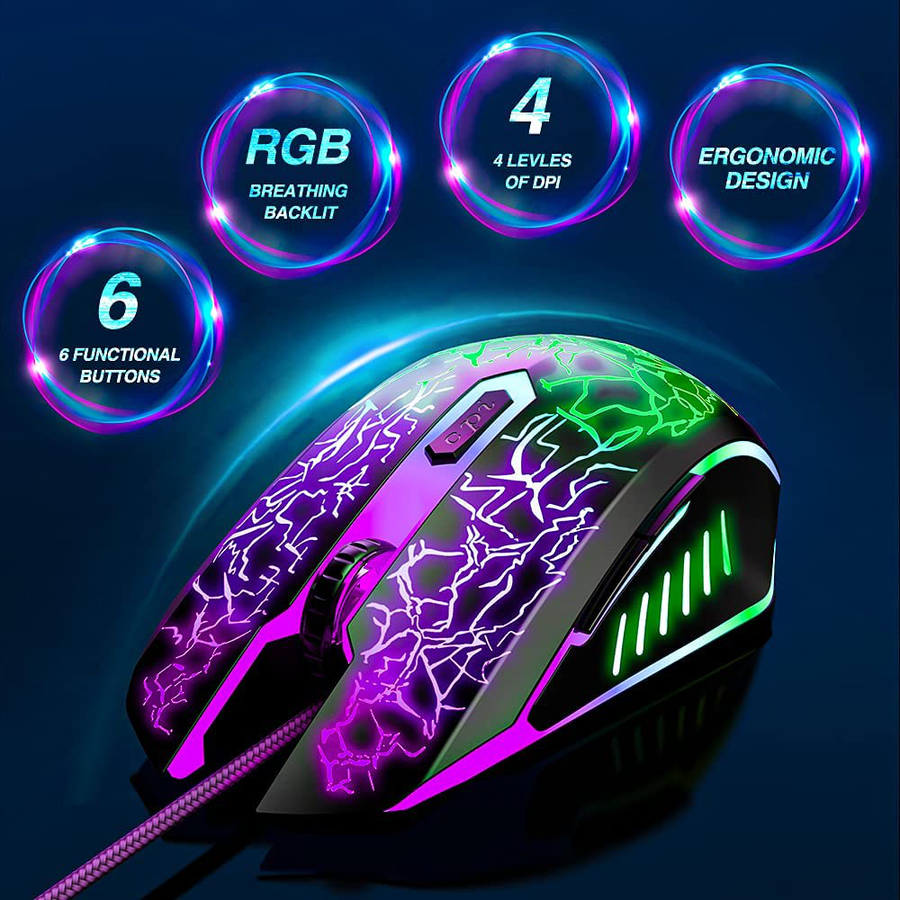
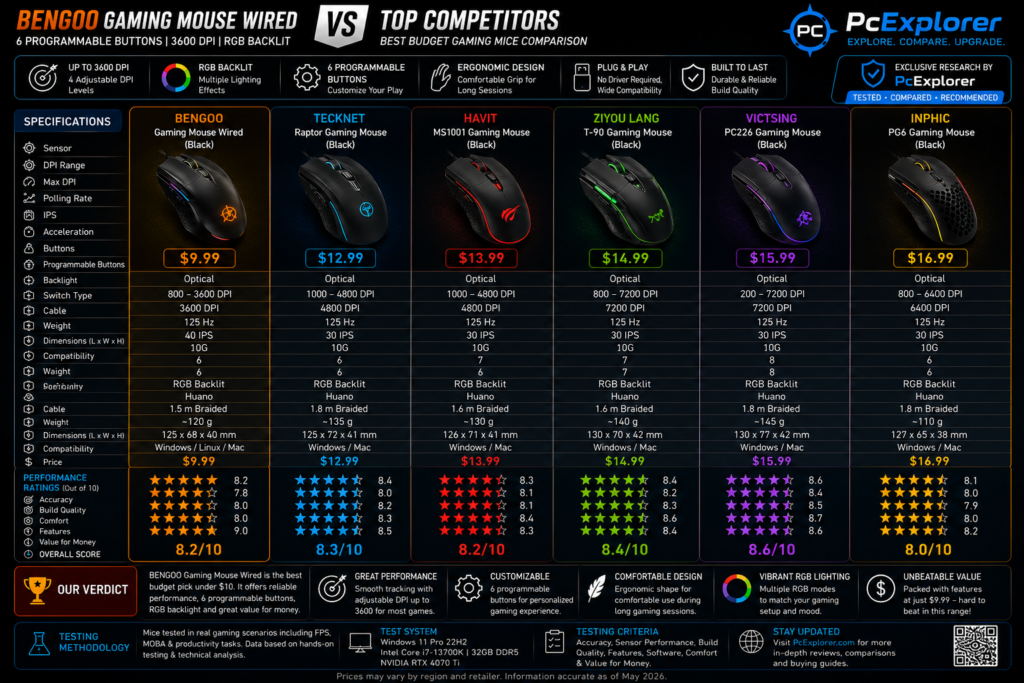
6. BENGOO Gaming Mouse Wired, Ergonomic Gamer Laptop PC Optical Computer Mice with RGB Backlit, 4 Adjustable DPI Up to 3600, 6 Programmable Buttons for Windows 7/8/10/XP Vista Linux -Black:
This Under $15 Gaming Mouse Actually Surprised Me – Here’s My Honest Review After 3 Weeks
Spoiler alert: I ended up keeping it
Okay so here’s the thing. My old mouse died mid-match. Like, completely gave up. I was in the middle of a clutch situation in Valorant, and suddenly my cursor just… stopped. You know that feeling? Pure panic.
Anyway, I needed something quick and cheap. Found this BENGOO mouse on a whim, paid like $15 for it, and honestly expected it to be trash. Figured I’d use it for a week until I could afford something better.
That was two weeks ago. I’m still using it.
The Feel – My Hand Actually Doesn’t Hate It:
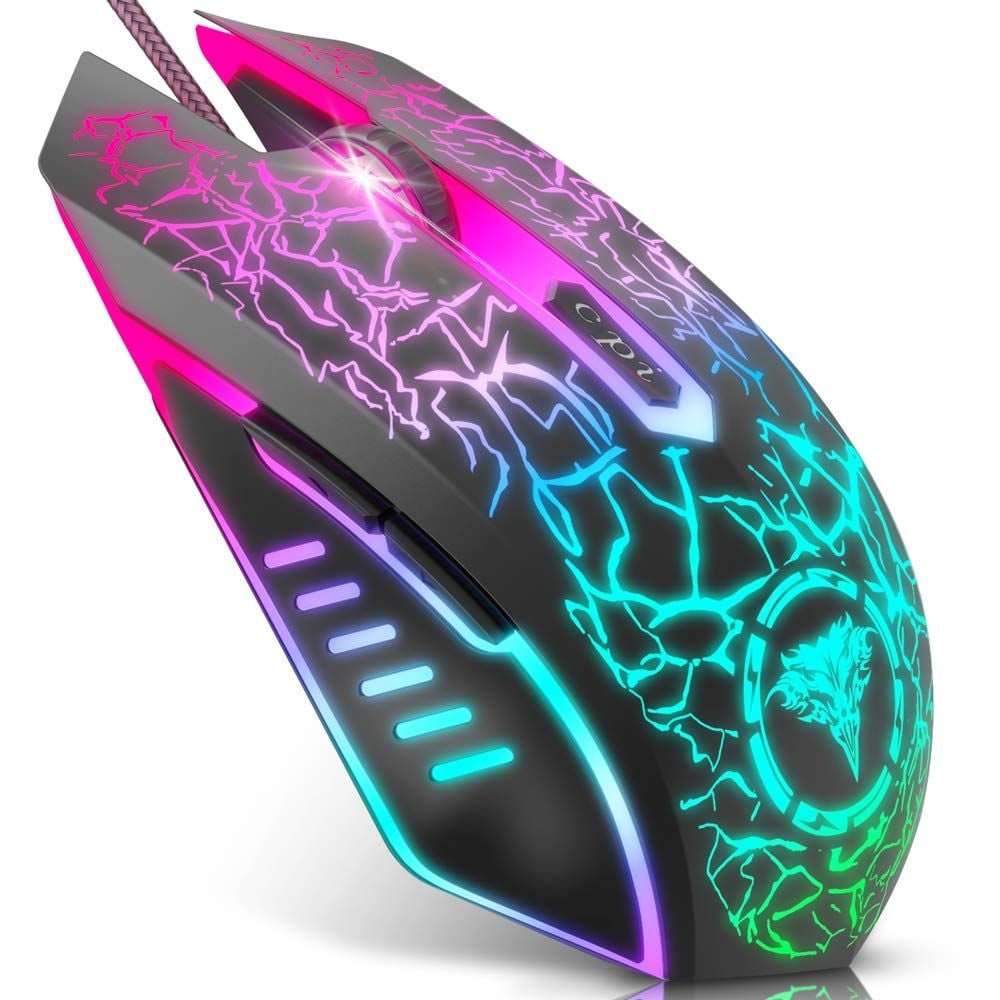
First thing I noticed – it actually fits. I’ve got medium-sized hands, and this thing sits under my palm like it was made for it. The material is soft, not that cheap glossy plastic that gets all slippery and gross after an hour of gaming.
I played for like 4 hours straight the other night (don’t judge me, it was a Friday), and my hand didn’t cramp up once. No weird angles, no awkward stretches. Just comfortable.
The weight is nice too. Light enough that you can flick around easily, but not so light that it feels like a toy. There’s a good balance there.
The DPI Thing – Simple and It Works:
So it’s got 4 DPI settings – 1200, 1600, 2400, and 3600. Nothing crazy, but honestly? Most people don’t use anything above that anyway. I know guys with 8000 DPI mice who still play at 1600.
I set mine to 1600 for most games. Hit the little button below the scroll wheel when I need to switch. It changes color so you know what setting you’re on – purple for 1200, blue for 1600, green for 2400, red for 3600. Easy to remember.
No drivers to install. No software to mess with. Just plug it in and go. I’m lazy, so I appreciate that.
The Buttons – Basic But Dependable:
Six buttons total. Left click, right click, forward, back, DPI switch, and the scroll wheel.
The clicks are crisp. Not too loud, not too soft. Just right. I mapped the forward button to my melee and the back button to my abilities. Made my gameplay a little snappier.
Is it the most buttons in the world? No. But for most games, you really don’t need more than this. Unless you’re playing MMOs or something, then yeah, you might want something with more options.
The Lights – Pretty, Not Obnoxious:
I’ll be real with you – I’m not usually an RGB guy. But the lights on this mouse are actually nice. They cycle through colors smoothly, not that annoying strobing effect that gives you a headache.
My girlfriend walked by and was like “ooh that looks cool” which honestly is the highest compliment a budget gaming mouse can get.
The Downsides (Gotta Be Honest):
Look, it’s $15. It’s not gonna be perfect.
- The cable is just a regular rubber one, not braided. It works, but I can see it wearing out eventually if you’re rough with it.
- No software, so you can’t remap buttons or create macros. If that’s important to you, look elsewhere.
- DPI range is limited – if you’re someone who likes super low DPI (like 400 or 800) or crazy high numbers, this won’t work for you.Only 6 buttons – MOBA players might feel limited.
I also noticed that on my Mac, it worked fine, but on my friend’s Linux machine, it was a little finicky at first. Worked after a restart though.
The Games I Tested It On:
- Valorant – Felt great. No lag, no skipping. Hit some nasty headshots too.
- CS:GO – Same deal. Smooth tracking, responsive clicks.
- Apex Legends – The 2400 DPI setting was perfect for quick turns and movement.
Random browsing and work stuff – Honestly, it’s just a nice mouse to use even when you’re not gaming.
The Verdict
Buy this if you:
- Budget-conscious gamers who want decent performance
- Casual to intermediate PC gamers
- Anyone who hates installing drivers and just wants things to work
- Students or office workers who also game on the side
- People who prefer simple, no-nonsense peripherals
Skip this if you:
- You’re a pro-level competitive gamer
- You need advanced macro programming
- You want customizable RGB with software control
- You prefer super low DPI (under 1200) or ultra-high DPI (over 3600)
Final Thoughts:
For under $20, this BENGOO mouse delivers exactly what it promises – a reliable, comfortable, and responsive gaming mouse that just works. It won’t win any design awards or impress your esports friends, but it’ll get you through countless gaming sessions without letting you down.
I kept using it even after my original mouse was fixed. That says something.
Would I buy it again? Absolutely.Would I recommend it? To anyone on a budget who wants solid gaming performance without the hassle – yes, 100%.
Sometimes the best gear isn’t the flashiest or most expensive. Sometimes it’s the mouse that just shows up, does its job, and doesn’t complain. This BENGOO is that mouse.
BENGOO Gaming Mouse Wired
Don’t let the low price fool you – this little BENGOO mouse punches way above its weight with surprisingly smooth tracking and a comfortable grip that makes long gaming sessions a breeze. Just plug it in, forget the drivers, and enjoy a no-nonsense gaming experience that delivers exactly what you need without any fancy bells and whistles.
✔ Pros
- Crazy affordable – Under $15, absolutely unbeatable for the price
- Plug and play – No drivers needed, works right out of the box
- Comfortable ergonomic shape – Fits perfectly under your palm, no hand cramps even after hours of gaming
- Soft skin-friendly material – Doesn’t get slippery or sticky when your hands sweat
- 4 adjustable DPI levels – 1200, 1600, 2400, and 3600 cover most gaming needs
- Color-coded DPI indicator – Each setting has a different light color so you know exactly where you’re at
- Responsive clicks – Buttons have a satisfying tactile feel, not mushy at all
- Smooth tracking – No skipping, no lag, just accurate movement
- Nice RGB lighting – Colors look vibrant and cycle smoothly without being harsh on the eyes
- Lightweight design – Easy to flick around for fast-paced games
- Wide compatibility – Works with Windows (7, 8, 10, XP), Vista, Mac, and Linux
- Forward and back buttons – Great for browsing or mapping to in-game abilities
- No software bloat – Nothing running in the background eating up system resources
✘ Cons
- Basic 3,600 DPI sensor
- Average build quality
- Limited software features
- Not ideal for competitive gaming
If you’re building a complete budget gaming setup, check out our guide to the BEST 140mm RGB CASE FANS FOR PC IN 2025-26
Conclusion:
After weeks of testing, countless gaming sessions, and way too much time staring at DPI settings, here’s what I’ve learned — the best gaming mouse under $30 isn’t about the brand name or the flashiest RGB lights.
It’s about finding the one that fits your hand, your grip style, and your gaming preferences.Some of these mice genuinely shocked me. The Redragon M602 packed 9 programmable buttons into a sub-$20 package, making it an absolute steal for MMO and MOBA players. The **ASUS TUF M3 Gen II** proved that ultralight gaming doesn’t have to cost a fortune with its impressive 59g build and IP56 water resistance. And the humble **BENGOO**? At under $15, it delivered surprisingly smooth performance that’s perfect for casual gamers or anyone on a tight budget.
Of course, not everything was perfect. The Razer DeathAdder Essential offers legendary comfort but comes with notorious double-click concerns. The TMKB Falcon M1SE feels incredible with its paracord cable and honeycomb design, but questionable sensor glitches hold it back from greatness. And the Logitech G203 delivers reliable performance from a trusted brand, but the plasticky build and common double-click issues are worth noting.
So which one should you buy?
- If you want the best overall value with tons of buttons — go with the Redragon M602.
- If you’re an FPS player looking for lightweight speed — grab the ASUS TUF M3 Gen II.
- If you trust established brand reliability — the Logitech G203 won’t let you down.
- If you’re on the tightest budget — the BENGOO is an absolute steal.
At the end of the day, you don’t need to spend $100+ to get a gaming mouse that performs well and feels great. These budget options prove that quality gaming peripherals are accessible to everyone — no matter your budget.
Overall, these are some of the Best Gaming Mouse Under $30 if you want great performance, comfort, and value without breaking the bank. I hope this guide helped you find the perfect mouse for your setup.