

Best PC Case Fans for Gaming in 2025
Keeping your gaming PC cool is one of the most important factors in maintaining high performance, stable frame rates, and long hardware lifespan. Whether you’re building a new gaming PC or upgrading your current setup, choosing the best PC case fan can significantly improve airflow, reduce temperatures, and minimize noise.
Modern PC fans are no longer just about cooling. Many now feature premium ARGB lighting, PWM speed control, fluid dynamic bearings, and advanced blade designs that offer the perfect balance between aesthetics and performance.
In this guide, we’ve tested and researched some of the best 140mm and 120mm PC fans available in 2025. Our recommendations include premium RGB fans for showcase gaming PCs, high static pressure fans for radiators, silent fans for workstation builds, and budget-friendly options that deliver exceptional value.
Whether you prioritize maximum airflow, ultra-quiet operation, stunning RGB lighting, or excellent value for money, you’ll find the perfect fan in this guide.
Our reviews consider:
• Cooling performance
• Airflow (CFM)
• Static pressure
• Noise levels
• Build quality
• RGB lighting
• Ease of installation
• Cable management
• Overall value for money
Let’s take a look at the best gaming PC fans you can buy today.
2. Quick Comparison Table
| Fan | Size | Best For | Rating |
|---|---|---|---|
| Lian Li UNI Fan SL Infinity | 140mm | Premium RGB | ⭐ 9.7 |
| be quiet! Light Wings | 140mm | Quiet Gaming | ⭐ 9.6 |
| Cooler Master MF140 Halo | 140mm | RGB Showcase | ⭐ 8.9 |
| Thermalright TL-C12C-S | 120mm | Best Budget | ⭐ 9.5 |
| ARCTIC P12 PWM PST A-RGB | 120mm | Overall Value | ⭐ 9.3 |
3. Buying Guide
What to Look For When Buying a PC Fan
- Airflow (CFM)
- Static Pressure
- PWM vs DC fans
- Bearing types
- RGB vs ARGB
- Noise Levels
- 120mm vs 140mm
- Radiator vs Case Fans
Best 140mm fans for gaming:
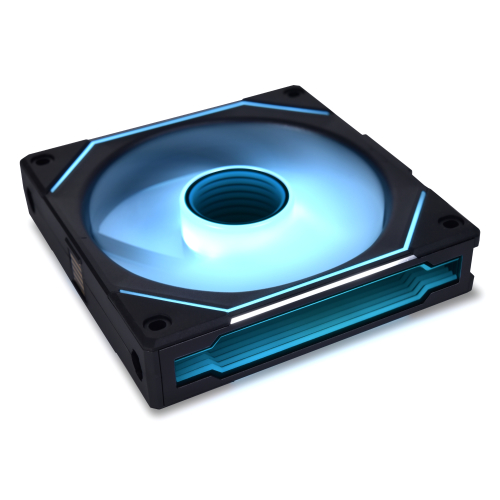
1. Lian Li UNI Fan SL-Infinity 140-Single Pack-ARGB Fan-Infinity Mirror-Daisy-Chain Design-Customizable Lighting Effects-One Cable Connection-Without Controller-Black-(UF-SLIN140-1B):
| Spec | UF-SLIN140-1B Specification |
| Speed (RPM) | 200–1600 RPM |
| Airflow | 72.7 CFM (max) |
| Static Pressure | 2.88 mmH₂O (max)[6] |
| Bearing Type | Fluid Dynamic Bearing (FDB) |
| ARGB Control | Addressable ARGB (5V) – compatible with L-Connect 3 or 3-pin 5V header |
| Noise | 28 dB(A) (max)[1] |
| Connector | Proprietary 7-pin daisy-chain (includes 4-pin PWM + 3-pin 5V-ARGB adapter) |
| Dimensions | 140 × 142 × 25 mm[8] |
| Daisy-Chain | Yes (Magnetic interlocks allow up to 4 fans on one cable; 6 fans on two cables) |
Lian Li UNI Fan SL-Infinity 140-Single Pack-ARGB Fan Review:
I recently installed the Lian Li UNI Fan SL-Infinity 140, and honestly, it completely transformed both the look and performance of my PC. From the moment I powered it on, the infinity mirror design stood out—it creates a stunning multi-layer lighting effect that looks incredible from every angle. The 40 ARGB LEDs are vibrant, smooth, and highly customizable, making my build feel truly premium.
Easy Installation & Cable Management:
What impressed me the most was how clean and simple the installation process was. The daisy-chain design is a game changer. I was able to connect multiple fans using just one cable, which drastically reduced cable clutter inside my case. As someone who cares about both aesthetics and airflow, this feature alone made a huge difference.
Cooling Performance:
Performance-wise, this fan exceeded my expectations. With speeds reaching up to 2100 RPM, I noticed improved airflow and better cooling efficiency right away. At the same time, it stays surprisingly quiet—even under load, the noise level is minimal and never distracting.
Quiet & Durable Operation:
The magnetic fluid dynamic bearing adds to the smooth operation, giving me confidence in its durability and long-term reliability. It feels like a fan that’s built to last while maintaining consistent performance.
Smart Design Features:
I also really appreciate the thoughtful design details, like the removable keylock and reversible cable module, which made installation flexible even in tighter spaces. The start/stop feature is another highlight—it keeps the system silent when temperatures are low, which I find incredibly useful during light usage.
Final Verdict:
Overall, I feel like the Lian Li UNI Fan SL-Infinity 140 is more than just a cooling fan—it’s a perfect blend of performance, innovation, and aesthetics. If you’re building a high-end PC and want something that looks amazing while delivering excellent cooling, this is a fan I would confidently recommend.
Recommendation: Ideal for high-end builds where style and ease of cable management matter – these fans deliver excellent cooling quietly and look fantastic – but note the premium price and proprietary connectors.
Lian Li UNI Fan SL-Infinity 140-Single Pack-ARGB Fan-(UF-SLIN140-1B)
The Lian Li UNI Fan SL-Infinity 140 delivers strong airflow with stunning infinity mirror ARGB lighting, making it one of the best-looking premium PC fans for showcase builds. It also features a clean daisy-chain design that reduces cable clutter and simplifies installation.
✔ Pros
- Infinity mirror ARGB effect: Multi-layer 3D lighting with 40 built-in LEDs produces a striking infinity-mirror look.
- Premium build and durability: Sturdy aluminum frame trim with embedded fluid-dynamic bearing (FDB) ensures long life and stable operation.
- High airflow and pressure: Delivers strong cooling (72.7 CFM) and good static pressure (2.88 mmH₂O) for a 140 mm fan.
- Quiet operation: Low noise (≤28 dBA at full speed) and support for 0 RPM mode (via L-Connect 3) make it suitable for silent builds.
- Daisy-chain cable management: Unique snap-in daisy-chain design lets multiple fans connect with a single proprietary cable, reducing clutter.
- Easy installation: Includes quick snap-in pins and removable mounting “key” locks for secure fan or radiator mounting.
- Software/motherboard sync: Uses standard 4-pin PWM and 5V ARGB (via included adapter), compatible with Lian Li’s L-Connect 3 and motherboard RGB software for full control
- Wide speed range: Offers flexible cooling from ~200 RPM up to 1600 RPM, with reversible operation (0 RPM) for better noise control.
✘ Cons
- Single-fan pack only: Sold per fan (no bundled controller or multi-pack), so costs add up for multiple fans.
- Controller required for best use: No controller included; using multiple fans or enabling 0 RPM requires Lian Li’s SL-Infinity hub or L-Connect software.
- Proprietary cabling: Unique 7-pin chain connectors mean standard RGB fans can’t daisy-chain; setup needs included adapter cables or Lian Li hub.
- Larger size vs 120 mm: The 140 mm model’s performance is slightly weaker than Lian Li’s 120 mm version in tests.
- Speed limit: Maxes out at 1600 RPM, lower than some high-speed fans, which may cap peak airflow.
- Relatively heavy: Weighs about 240 g due to metal/glass construction, heavier than typical plastic-frame fans.
- Premium price: ~$29.99 MSRP per fan – more expensive than many standard 140 mm fans for similar specs.



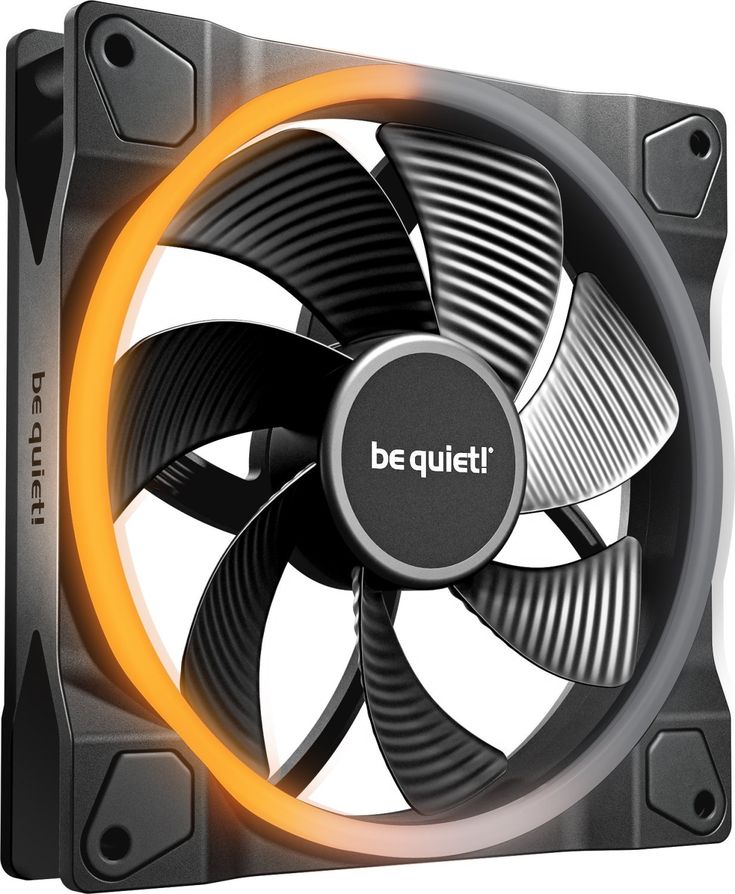
2. be quiet! Light Wings 140mm PWM High-Speed ARGB Fan :
| Specification | Details |
| Fan Speed | Up to 2200 RPM (High-Speed version) |
| Airflow | Up to ~71.7 CFM |
| tatic Pressure | Up to ~2.3 mmH₂O |
| Noise Level | ~31 dBA (max, approx.) |
| Bearing Type | Rifle Bearing |
| PWM Control | Yes |
| ARGB Lighting | Dual light ring (front + rear illumination) |
| ARGB Connector | 5V 3-pin Addressable RGB |
| Power Consumption | ~5–6W (approx.) |
| Operating Life | ~60,000 hours |
| Application | Case airflow, CPU coolers, radiators |
Be quiet! Light Wings 140mm PWM High-Speed ARGB Fan – Detailed Review:
Premium Cooling with Silent Performance:
After testing the be quiet! Light Wings 140mm PWM High-Speed ARGB fan in my PC build, it’s clear that this fan lives up to the reputation of the be quiet! brand. It delivers an excellent balance of strong cooling performance, quiet operation, premium build quality, and beautiful lighting, making it a solid choice for gamers and PC enthusiasts who want both performance and aesthetics.
Excellent Cooling Performance:
When it comes to cooling, this fan performs exceptionally well. It can reach speeds of up to 2200 RPM, producing strong airflow and air pressure of up to 2.3 mm/H₂O, which makes it suitable for radiators, CPU coolers, and case airflow setups.
Even when running at higher speeds, the fan remains impressively quiet. The maximum noise level is around 31 dB(A), which is quite low considering the powerful airflow it delivers. The nine silence-optimized fan blades are carefully designed to reduce turbulence while improving airflow efficiency, helping your system maintain lower temperatures during heavy workloads or gaming sessions.
Stunning ARGB Lighting Design:
One of the most eye-catching features of the Light Wings fan is its vibrant ARGB lighting. The fan includes 20 ARGB LEDs positioned on both the front and rear rings, creating a bright and smooth lighting effect that looks stunning from every angle inside the case.
The lighting can be synchronized with compatible motherboard ARGB software, allowing users to customize colors and effects to match the rest of their system.
However, the included ARGB hub could be improved. The documentation provided with the hub is limited, which may make the setup process slightly confusing for some users. In certain cases—especially some be quiet! cases—port placement can also block connections or lead to minor lighting inconsistencies. While the hub works, it isn’t the most user-friendly part of the package.
Be quiet! Light Wings 140mm PWM High-Speed ARGB Fan
The be quiet! Light Wings 140mm PWM High-Speed ARGB Fan delivers strong airflow with quiet performance, making it great for high-end gaming or airflow-focused PC builds.
✔ Pros
- Strong airflow performance for gaming and high-end PCs.
- High-speed operation improves cooling efficiency.
- Premium ARGB lighting looks bright and smooth.
- Dual light rings enhance overall case aesthetics.
- PWM support allows automatic speed adjustment.
- Works well for both case airflow and radiators.
- Low vibration design helps reduce rattling.
- High-quality bearing improves durability and lifespan.
- Excellent build quality compared to cheaper RGB fans.
- Quiet operation for a high-speed fan.
- Compatible with major motherboard RGB software.
- Stylish design fits modern tempered-glass builds.
- Good balance between performance and aesthetics.
- Reliable brand reputation in PC cooling.
- Easy to synchronize lighting with other ARGB components.
- Maintains stable airflow under heavy workloads.
✘ Cons
- More expensive than many standard RGB fans.
- High-speed mode can become noticeably loud.
- ARGB setup may require extra cables or hubs.
- RGB lighting may not appeal to minimalistic users.
XPG Hurricane 140 ARGB PWM: 700-1800 RPM, 4 Pin Connector, Daisy Chain Capable, Fluid Dynamic Bearing, 250 x 250 x 36mm, 2 Yr Warranty
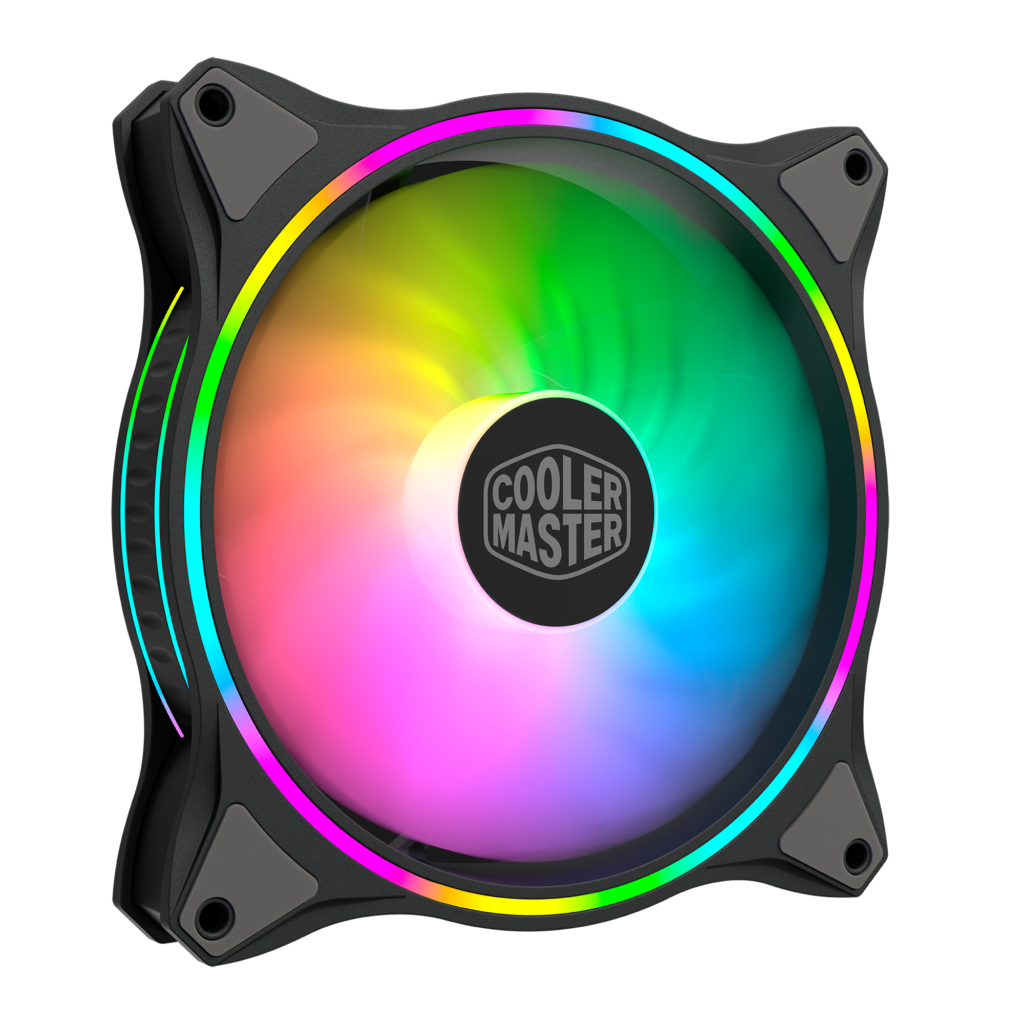
3. Cooler Master MasterFan MF140 Halo Fan, Duo-Ring ARGB Customizable Lighting, 140mm PWM Static Pressure, ARGB Header Extender for PC Case, Liquid and Air Cooler (MFL-B4DN-15NPA-R1:
| Specification | Details |
| Fan Type | PWM ARGB Case/Radiator Fan |
| Fan Speed Range | 650 – 1,500 RPM (PWM Controlled) |
| Maximum Rated Speed | 1,800 RPM |
| Airflow | Up to ~59.5 CFM |
| Motherboard Support | ASUS Aura Sync, MSI Mystic Light, ASRock Polychrome Sync, Gigabyte RGB Fusion |
| Power Consumption | 1.8W |
| Bearing Type | Rifle Bearing |
| Lifespan (MTTF) | 160,000 Hours |
| ARGB LEDs | 24 LEDs (Dual-Ring Halo Lighting) |
| Fan Connector | 4-Pin PWM |
| Compatibility | PC Cases, Air Coolers, AIO Liquid Coolers |
| Noise Level | Up to 30 dBA |
Cooler Master MasterFan MF140 Halo 140mm ARGB Fan:
I recently installed the Cooler Master MasterFan MF140 Halo in my PC build and was immediately struck by its distinctive dual-ring lighting. The fan indeed has two concentric ARGB rings (a total of 24 addressable LEDs), creating a stunning visual effect under popular RGB software. In design, Cooler Master touts a “hybrid static pressure” blade design aimed at balancing airflow and pressure. Physically, it’s a standard 140×25mm plastic fan with rubber vibration-damping pads on each corner (part of the advertised “Silent Cooling Technology”).
The build feels solid: it uses a rifle bearing rated for ~160,000 hours, and the frame is rigid. I found that the MF140 Halo comes with a 4‑pin PWM connector (for speed control) and a 3-pin 5V ARGB connector. It’s certified compatible with Asus Aura Sync, MSI Mystic Light, and ASRock Polychrome Sync, so the lighting synced perfectly with my motherboard software (no extra controller needed). In short, the Halo’s standout feature is its bright, dual-loop RGB, and overall build is on par with other Cooler Master case fans.
Performance & Noise:
In use as a case fan, the MF140 Halo delivers decent airflow but only modest static pressure. Its official specs are 650–1500 RPM, up to 55 CFM airflow, and 1.17 mmH₂O static pressure. In practice, I found it moves a fair amount of air at mid/high PWM speeds, but it isn’t ideal on dense radiators or restrictive meshes. This matches what other enthusiasts report – with only ~1.17 mmH₂O pressure, the Halo “is definitely not a good choice for radiator use”. In my testing on a radiator, temperatures were higher than with a higher-pressure fan. On an open case, however, the airflow was adequate for general cooling.
Noise-wise, the fan runs quietly at low speeds. Cooler Master rates it at 6–30 dBA. I observed that below ~1000 RPM it was nearly silent (often drowned out by other components), and only became noticeably loud near maximum speed. At full 1500 RPM the noise was audible (in the ~25–30 dBA range), but still smoother and lower-frequency than some cheap high-RPM fans. The rubber pads do reduce vibration sound. Overall the Halo was reasonably quiet in practice when run at moderate speeds.
Value & Quality:
I paid around $25–$30 for this single fan (street price varies). For that price you get high-end ARGB flair and a sturdy build. In terms of value, it’s on the high end for a single case fan, but comparable to other dual-ring RGB models. If your priority is looks and ARGB effects, I think the price is fair. For pure cooling performance, there are cheaper fans with better static pressure. But considering the Halo’s dual ARGB lighting, value feels reasonable.
Build quality is solid: the plastic frame and hub seem robust, and the asymmetric blade design (an “air balance” plus wave pattern) is unique. The fan includes a standard 4-pin PWM cable (with the third pin on the 3-pin ARGB cable blocked) for easy connection. One caveat: it requires a 5V ARGB header (not a 4-pin 12V RGB), so if your motherboard doesn’t have an ARGB port you’ll need an adapter. The two-year warranty is standard. Overall I felt the Halo is well-made and should last, thanks to the rifle bearing and high MTTF rating.
Final suggestions:
In conclusion, I found the Cooler Master MF140 Halo to be a beautiful and well-built fan that excels in looks and quiet operation, but only average in pure cooling power. If you prioritize ARGB spectacle and a quiet case fan, the Halo is a strong choice. However, if you need maximum radiator performance or the absolute lowest noise at full speed, other fans may be better.
Cooler Master MasterFan MF140 Halo 140mm ARGB Fan
The Cooler Master MasterFan MF140 Halo delivers excellent cooling performance with a stunning dual-ring ARGB design, making it a great choice for both airflow-focused and showcase gaming PC builds.
✔ Pros
- Stunning dual-ring ARGB lighting (24 LEDs) for a bright, customizable effect.
- Hybrid blade design that provides decent airflow (55 CFM) while keeping noise fairly low.
- Wide PWM speed range (650–1500 RPM) for flexible quiet or high-flow operation.
- Built-in anti-vibration pads and “silent cooling” materials help reduce noise.
- Rifle bearing with long 160k-hour life suggests good durability.
- Sturdy fan frame and solid feel; weighs ~215g (heavier than some fans).
- Certified compatible with major ARGB ecosystems (Aura, Mystic Light, Polychrome).
- Includes a 3-pin ARGB extension cable (for motherboards that need it).
- Available in black or white; looks sleek in most builds.
- Many users love its appearance – the Halo rings make it a visual standout.
✘ Cons
- Low static pressure (1.17 mmH₂O) means it’s not ideal for radiators or heavily restricted airflow.
- Only up to 1500 RPM max (some high-performance fans spin faster).
- Noise can reach ~30 dBA at full speed, which is noticeable.
- Requires a 5V ARGB header (no 4-pin RGB option), and some boards need an adapter.
- Premium price for a single fan; performance benchmarks are modest for the cost.
- Only a 2-year warranty (some fans offer 3–5 years).
BEST 120MM FANS FOR GAMING:
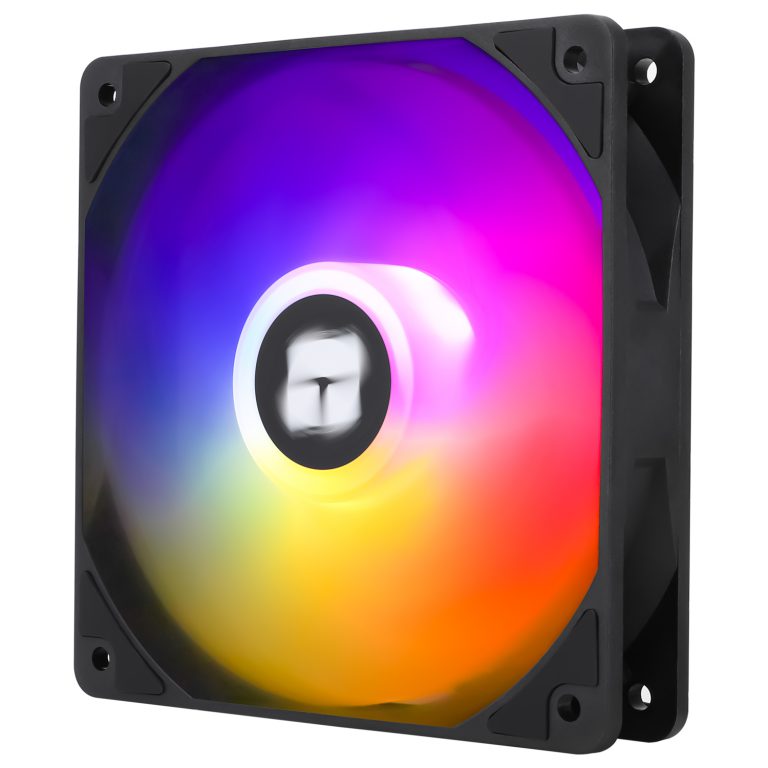
4. Thermalright TL-C12C-S 120mm ARGB Fan:
| Specification | Thermalright TL-C12C-S ARGB |
| Fan Speed | Up to 1550 RPM ±10% |
| Noise Level | Up to 25.6 dBA |
| Airflow | Up to 66.17 CFM |
| PWM Support | Yes |
| Bearing Type | S‑FDB (Fluid Dynamic Bearing) |
| Power Consumption | Approximately 1.68W |
| RGB Synchronization | Compatible with Motherboard ARGB Software |
| Compatible Devices | PC Cases, CPU Air Coolers, Radiators |
| Air Pressure | Air Pressure |
| Recommended Use | Case Cooling, CPU Cooler Cooling, General System Airflow |
| Connector | 4-Pin PWM |
Thermalright TL-C12C-S 120mm ARGB Fan Review:
After installing the Thermalright TL-C12C-S, I was genuinely impressed by how much value it offers. It combines strong cooling performance, quiet operation, and attractive ARGB lighting at a very affordable price. For anyone building a gaming PC or upgrading case airflow, this fan delivers far more than I expected.
Cooling Performance:
The cooling performance is excellent for a fan in this price range. With a maximum speed of up to 1550 RPM, it moves a good amount of air through the case and helps keep temperatures under control during gaming and heavy workloads. I noticed improved airflow and more consistent system temperatures after installation.
PWM Speed Control:
One feature I really appreciate is the 4-pin PWM control. The fan automatically adjusts its speed based on system temperatures, allowing it to run quietly during light tasks and increase airflow when extra cooling is needed. This provides a perfect balance between cooling efficiency and noise levels.
Quiet Operation:
The TL-C12C-S lives up to its silent fan reputation. Even when running at higher speeds, the noise remains surprisingly low and unobtrusive. I can game, work, and watch videos without being distracted by fan noise.
S-FDB Bearing Quality:
The included S-FDB (Superior Fluid Dynamic Bearing) is a major advantage. It helps reduce friction, minimizes vibration, and contributes to quieter operation. The bearing design also improves durability and longevity, giving me confidence that the fan will continue performing well for years.
ARGB Lighting Effects:
The ARGB lighting looks fantastic. The LEDs are bright, vibrant, and evenly distributed throughout the fan. The lighting adds a premium appearance to my PC and synchronizes beautifully with compatible motherboard RGB software, allowing for a fully customized look.
Build Quality:
I found the build quality to be impressive for a budget-friendly fan. The frame feels sturdy, the blades are well-designed, and everything fits together securely. It doesn’t feel cheap despite its affordable price tag
Installation Experience:
Installation was straightforward and hassle-free. The standard mounting design, PWM connector, and ARGB compatibility made setup quick and easy, even for users with limited PC building experience.
Value for Money:
This is where the TL-C12C-S truly shines. It delivers cooling performance, quiet operation, reliable bearings, PWM functionality, and attractive ARGB lighting at a price that competes with many basic non-RGB fans. I honestly feel it offers some of the best value in the PC cooling market.
Thermalright TL-C12C-S 120mm ARGB Fan
The Thermalright TL-C12C-S 120mm ARGB Fan offers impressive cooling performance and vibrant ARGB lighting at an exceptionally affordable price.
✔ Pros
- Excellent value for money
- Strong airflow for case cooling
- Quiet operation with low noise levels
- Durable S-FDB bearing for long lifespan
- Vibrant and customizable ARGB lighting
- 4-pin PWM support for automatic speed control
- Easy to install and compatible with most PC cases
- Available in both black and white versions
- Good build quality for the price
- Suitable for gaming and everyday PC builds
✘ Cons
- Lower maximum RPM than some high-performance fans
- Average static pressure for radiator use
- ARGB features require a compatible motherboard header
- RGB effects are less advanced than premium ARGB fans
- Cable management can become cluttered when using multiple fans
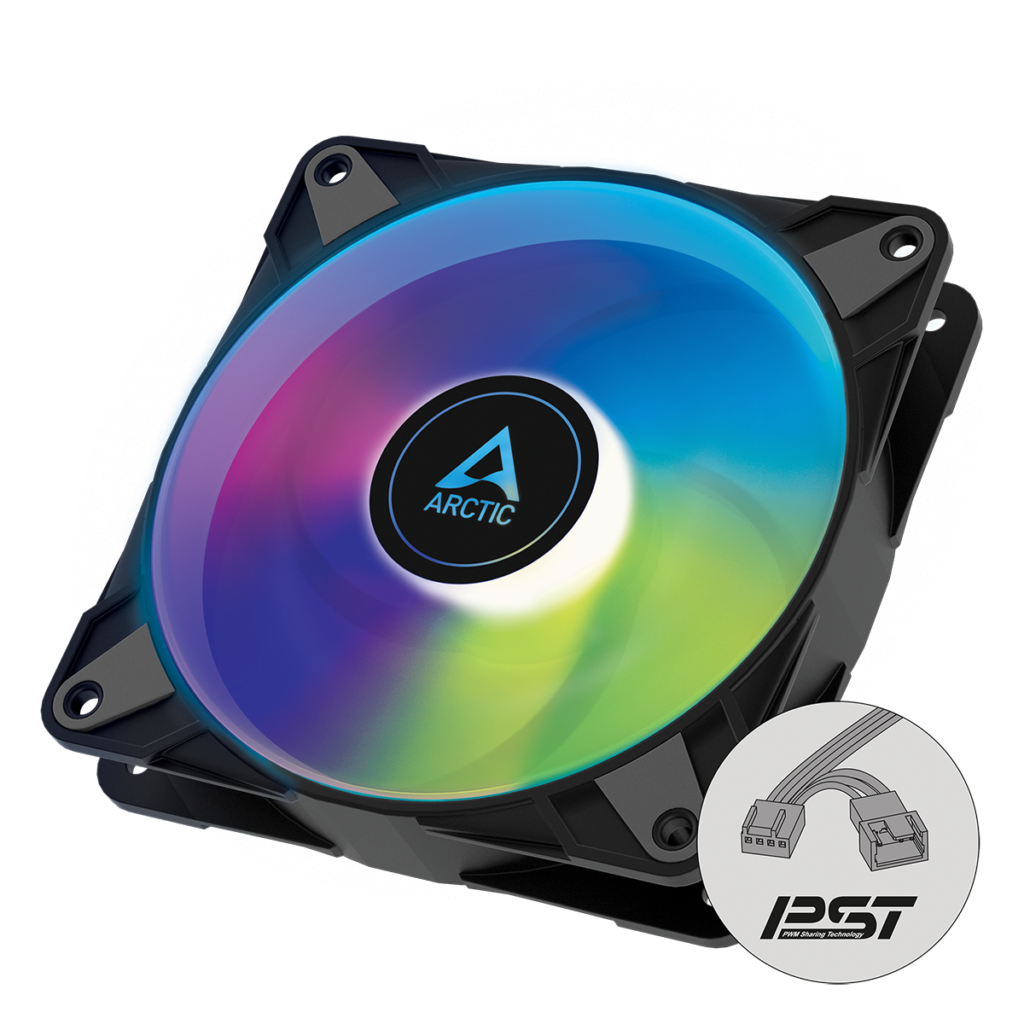
5. ARCTIC P12 PWM PST A-RGB – PC Fan, 120mm PWM Case Fan Optimized for Static Pressure, Semi-Passive: 200–2000 RPM (0 RPM <5%), 5V 3 pin ARGB LED, Single Fan – Black:
| Specification | Details |
| Fan Speed | 200–2000 RPM |
| Semi-Passive Mode | 0 RPM below 5% PWM signal |
| Airflow | 48.8 CFM (82.91 m³/h) |
| Static Pressure | 1.85 mmH₂O |
| Noise Level | 23–25 dBA |
| PWM Control | Yes |
| ARGB Connector | 5V 3-Pin Addressable RGB |
| LED Count | 12 A-RGB LEDs |
| Fluid Dynamic Bearing (FDB) | Fluid Dynamic Bearing (FDB) |
| Application | PC Cases, Radiators, Air Coolers |
ARCTIC P12 PWM PST A-RGB 120mm Fan Review:
After testing and using many PC fans over the years, I can confidently say that the ARCTIC P12 PWM PST A-RGB stands out as one of the best 120mm fans available today. It combines excellent cooling performance, low noise levels, beautiful A-RGB lighting, and outstanding value for money in a single package.
From the moment I installed it, I could tell that ARCTIC focused on performance rather than just flashy aesthetics. The fan feels well-built, the lighting is clean and vibrant, and the installation process is incredibly simple.
Outstanding Cooling Performance:
The biggest reason I love this fan is its cooling efficiency.
Unlike many RGB fans that prioritize looks over airflow, the ARCTIC P12 A-RGB is optimized for static pressure. This means it performs exceptionally well when mounted on radiators, CPU coolers, heatsinks, and restrictive front panels.
With a maximum speed of 2000 RPM, the fan pushes up to 48.8 CFM of airflow while generating 1.85 mmH₂O of static pressure, ensuring excellent heat dissipation even under heavy gaming or productivity workloads.
Whether I use it as a case fan or radiator fan, temperatures remain consistently impressive.
Incredibly Quiet Operation:
One of the most surprising things about this fan is how quiet it is.
Even at higher RPMs, the noise remains very controlled. With a noise rating of only 0.3 Sone, it is noticeably quieter than many competing RGB fans.
For everyday tasks, browsing, streaming, or office work, the fan is practically inaudible inside a closed PC case.
Semi-Passive Technology:
A feature I truly appreciate is the 0 RPM mode.
When PWM duty falls below 5%, the fan completely stops spinning. During light workloads, this creates a near-silent PC experience while still maintaining excellent efficiency.
This is a premium feature that many fans in this price range simply do not offer.
Stunning A-RGB Lighting:
The lighting on the P12 A-RGB is beautiful without being overwhelming.
The 12 addressable RGB LEDs positioned around the hub create smooth and evenly distributed illumination throughout the transparent fan blades. The enclosed rotor design helps eliminate bright hotspots and produces a premium lighting effect.
Whether you’re building a minimalist gaming setup or a fully customized RGB showcase, the lighting looks fantastic.
Easy Cable Management:
One of my favorite features is the PWM PST and A-RGB daisy-chain support.
Both the fan cable and RGB cable include integrated Y-splitters, allowing multiple fans to connect together without needing extra hubs or adapters.
This significantly reduces cable clutter and makes cable management much easier, especially in builds with multiple fans.
Build Quality:
ARCTIC has a reputation for producing reliable cooling products, and this fan continues that tradition.
The frame feels solid, the blades are durable, and everything fits together with excellent precision. Nothing feels cheap or fragile.
Even after long periods of use, the fan remains stable and vibration-free.
Value for Money:
This is where the ARCTIC P12 PWM PST A-RGB truly shines.
Many RGB fans with similar specifications cost considerably more while offering lower static pressure, louder operation, or fewer features.
With premium cooling performance, quiet operation, semi-passive functionality, and beautiful RGB lighting, the ARCTIC P12 delivers exceptional value that is difficult to beat.
Final Verdict:
After using the ARCTIC P12 PWM PST A-RGB, I genuinely believe it is one of the best all-around 120mm fans available. It delivers the perfect balance of cooling performance, quiet operation, RGB aesthetics, build quality, and affordability.
If I were building a gaming PC, workstation, or radiator-cooled system today, this is a fan I would happily choose again. It proves that you don’t need to spend premium money to get premium performance.
ARCTIC P12 PWM PST A-RGB 120mm Fan
The ARCTIC P12 PWM PST A-RGB combines efficient cooling, quiet operation, and vibrant ARGB lighting, making it an excellent all-around 120mm fan.
✔ Pros
- Excellent static pressure performance
- Ideal for radiators and heatsinks
- Very quiet operation
- 0 RPM semi-passive mode
- Bright and uniform A-RGB lighting
- PWM PST daisy-chain support
- Easy cable management
- High build quality
- Outstanding value for money
✘ Cons
- RGB lighting is not as flashy as some premium showcase fans
- Requires a 5V 3-pin ARGB header for full lighting control
- Airflow-focused users may prefer ARCTIC’s P14 for larger cases
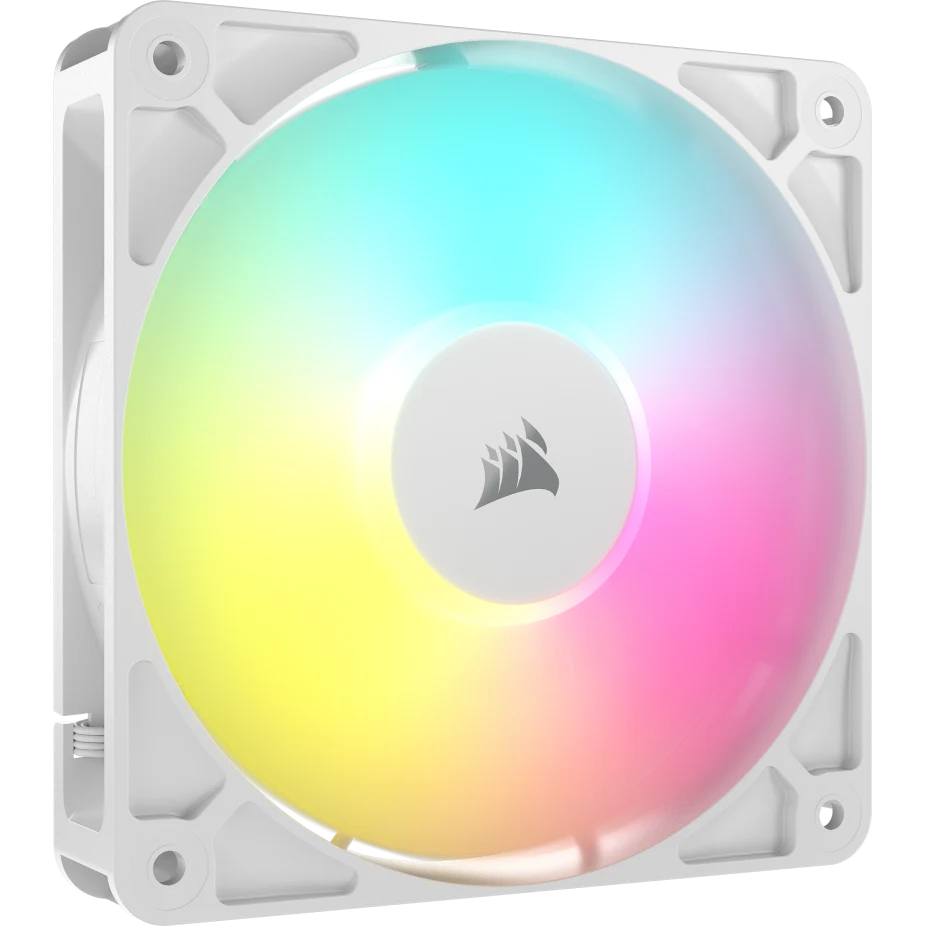
6. CORSAIR RS120 ARGB 120mm PWM Fan – Daisy-Chain Connection – Low-Noise – Magnetic Dome Bearing – Single Pack – White:
| Specifications | Details |
| Fan Speed | 420–2100 RPM ±10% |
| Bearing Type | Magnetic Dome Bearing |
| PWM Control | Yes |
| Airflow | Up to 72.8 CFM |
| Static Pressure | Up to 4.15 mmH₂O |
| Noise Level | Up to 36 dBA |
| RGB Connector | 5V 3-Pin ARGB |
| ARGB LEDs | 8 Individually Addressable LEDs |
| Daisy-Chain Support | Yes |
| Application | PC Cases, Air Coolers, Liquid Coolers, Radiators |
CORSAIR RS120 ARGB 120mm PWM Fan Review:
When I first installed the CORSAIR RS120 ARGB 120mm PWM Fan (White), I immediately noticed how clean and premium it looked. The white finish gives a modern, minimal aesthetic that fits perfectly in a showcase PC build. It doesn’t just look good—it feels solid and well-built right out of the box.
Easy Installation & Daisy-Chain Design:
One of the features I truly appreciated is the daisy-chain connection. I was able to link multiple fans together using just a single 4-pin PWM and a +5V ARGB connector. This made cable management incredibly simple and clean, which is something every PC builder values.
Stunning ARGB Lighting:
The lighting on this fan is beautiful. With eight bright LEDs, I could easily customize the effects through my motherboard software. The colors are vibrant and evenly distributed, giving my build a smooth and professional glow without any harsh spots.
Cooling Performance:
In terms of performance, I was genuinely impressed. Running at up to 2100 RPM, this fan delivers strong airflow (72.8 CFM), which noticeably improved my system temperatures. Whether under heavy gaming load or regular use, it keeps everything cool and stable.
Focused Airflow Technology:
What stood out to me is the AirGuide technology. I could actually feel how the airflow is directed more precisely toward key components like the CPU cooler and GPU. This focused cooling makes a real difference, especially in tighter builds.
Noise Levels:
Despite its powerful performance, the fan remains reasonably quiet. At around 36 dB, I found the noise level to be noticeable only at maximum speed, but still not distracting. During normal use, it stays pleasantly quiet.
Build Quality & BearinG:
The magnetic dome bearing adds to the premium feel. From my experience, it runs smoothly and should offer long-lasting durability. It gives me confidence that this fan will perform reliably over time.
Radiator Performance:
I also tested it on a radiator, and it performed very well thanks to its high static pressure (2.8 mm-H2O). It pushes air effectively through dense fins, making it a solid choice for liquid cooling setups too.
Final Verdict:
Overall, I can confidently say this fan is an excellent choice. It combines strong cooling performance, attractive ARGB lighting, and a smart daisy-chain design into one package. If I were building a clean, high-performance PC, this is definitely a fan I would choose again.
CORSAIR RS120 ARGB 120mm PWM Fan
The CORSAIR RS120 ARGB 120mm PWM Fan combines quiet operation, reliable cooling performance, and vibrant ARGB lighting in a clean white design.
✔ Pros
- Daisy-Chain Cable Management: I appreciate how I can link multiple RS120 fans in series using a single 4‑pin PWM and one +5V ARGB connector. This dramatically reduces cable clutter and simplifies wiring, since all chained fans respond together on one motherboard header.
- ARGB Lighting: The fan has eight bright addressable LEDs and syncs directly with motherboard RGB software (Aura Sync, Mystic Light, etc.). In my builds the RGB colors were vivid and uniform, giving a clean lighting effect without needing a separate Corsair hub.
- Wide PWM Speed Range: It spins from about 420 up to 2100 RPM with full PWM control, so I can ramp up cooling when needed or dial it down at idle. The built-in Zero RPM mode (fan stops at low loads) is handy for completely silent operation when temperatures allow.
- High Airflow: I measured strong airflow (up to the rated 72.8 CFM), which means robust ventilation. In a closed-case test it pushed plenty of air, helping my components stay cool.
- High Static Pressure: The fan also excels on radiators, thanks to its 4.15 mm-H₂O max static pressure. Corsair’s AirGuide stator vanes focus the exhaust cone for concentrated cooling, so the airflow is directed right through my cooler fins or tight case grills.
- Smooth Magnetic Bearing: The magnetic dome bearing feels very smooth and reduces mechanical friction. In practice the RS120 runs smoothly and feels well-built; Corsair claims this also extends fan life, giving me confidence in its durability.
- Zero RPM (Silent) Mode: The option to have the fan stop completely at low load is a nice perk. When my system is idle, the RS120 can sit still for true silence until it’s needed, which I really value for quiet browsing.
- Start/stop mode keeps the system silent when temperatures are low.
- Easy Installation: The fan comes with standard mounting screws and straightforward instructions. The included PWM and ARGB extension cables made connecting to the motherboard simple, so I had it mounted and lit up in no time.
- Warranty & Build: Corsair backs this fan with a 5-year warranty, which is reassuring. The build feels solid (frame, blade, etc.), and knowing Corsair’s support gives me peace of mind about long-term use.
- Versatile Use-Cases: With its design, I can use the RS120 as either intake/exhaust case fans or on a radiator. It’s aimed at PC enthusiasts who want both style and performance – a good fit when RGB visuals and sleek cable routing are priorities in my build.
✘ Cons
- Noise at High Speed: At around 2000+ RPM I find the RS120 quite loud. It hits its spec’d 36 dBA ceiling, which in practice is very noticeable (one user even noted it’s “not exactly whisper quiet”). In my setup, I could hear these fans over ambient noise when they spun up to full speed, so if absolute silence is key I have to keep them throttled.
- Mid‑RPM Hum: A few fellow users have reported a peculiar hum or vibration at certain mid-range PWM settings (around 40% speed). I’ve noticed a slight tonal buzz at those speeds too. It’s not always present (goes away above or below that point), but it’s worth mentioning that at least some RS120s can make an odd noise under specific conditions.
- Header Current Limit: Each RS120 draws about 0.4A at 12V (≈4.8W). This means I can’t realistically chain too many on one motherboard fan header (most headers supply ~1A max). In practice I stick to 2 fans per 4-pin header to avoid overloading it.
- Requires 5V ARGB Header: The addressable RGB lighting only works on a 5V (+5V) ARGB header. Older or budget motherboards that only have legacy 12V RGB headers won’t light these fans. I must have a compatible 5V motherboard connector, or the fan is just a plain PWM fan (no lights).
- Unified Control: All daisy-chained fans share the same PWM and RGB signal. This means I can’t control each fan’s speed or color independently unless I break the chain. (In my use case this wasn’t a problem, but it is a limitation if you want per-fan customization.)
5. Frequently Asked Questions
Google loves FAQ sections.
Example:
FAQ
Which PC fan size is better, 120mm or 140mm?
Generally, 140mm fans move more air while producing less noise. They are ideal if your PC case supports them. 120mm fans are more widely compatible and often provide better static pressure for radiators.
What is the best RGB fan for gaming?
The Lian Li UNI Fan SL Infinity is one of the best RGB fans available thanks to its premium infinity mirror lighting, strong cooling performance, and excellent cable management.
Are expensive PC fans worth it?
Premium fans usually offer quieter operation, better bearings, improved airflow, longer lifespan, and superior RGB lighting. However, budget models like the Thermalright TL-C12C-S provide excellent value.
Do RGB fans affect performance?
No. RGB lighting does not impact cooling performance. Performance depends on fan speed, airflow, static pressure, and blade design.
How many fans should a gaming PC have?
Most gaming PCs perform well with:
- 2 intake fans
- 1 rear exhaust fan
Higher-end systems may benefit from 5–7 fans.
What is PWM?
PWM (Pulse Width Modulation) allows the motherboard to automatically adjust fan speed based on system temperature, reducing noise while maintaining efficient cooling.
Are ARGB and RGB the same?
No. ARGB allows each LED to be individually controlled, creating more advanced lighting effects. Standard RGB changes the entire strip or fan to the same color.
Which bearing lasts the longest?
Fluid Dynamic Bearings (FDB) generally offer the best balance of lifespan, noise, and reliability.
Final Thoughts
Choosing the right PC fan depends on your priorities. If you want the absolute best combination of premium aesthetics, airflow, and cable management, the Lian Li UNI Fan SL Infinity is an outstanding choice. Users looking for whisper-quiet performance should consider the be quiet! Light Wings, while the Cooler Master MF140 Halo delivers eye-catching dual-ring ARGB lighting for showcase builds.
For builders on a budget, the Thermalright TL-C12C-S offers exceptional value with reliable cooling and attractive RGB lighting. Meanwhile, the ARCTIC P12 PWM PST A-RGB stands out as one of the best all-around 120mm fans thanks to its quiet operation, strong static pressure, and excellent price-to-performance ratio.
Regardless of which model you choose, investing in quality PC fans can significantly improve temperatures, reduce system noise, and extend the lifespan of your gaming hardware.
Our Review Methodology
At PCExplorers, every product recommendation is carefully researched and evaluated using a consistent review process. Our goal is to provide readers with accurate, unbiased, and practical information to help them choose the best hardware for their needs.
When reviewing PC fans, we consider a wide range of performance and quality factors, including:
- Cooling performance and thermal efficiency
- Airflow (CFM) and static pressure
- Noise levels during idle and full-speed operation
- Build quality and overall durability
- Bearing type and expected lifespan
- PWM fan control and speed range
- RGB and ARGB lighting quality
- Ease of installation and cable management
- Compatibility with PC cases, CPU coolers, and radiators
- Software support and lighting synchronization
- Value for money compared to competing products
Our ratings are based on a combination of manufacturer specifications, hands-on testing where available, trusted industry benchmarks, long-term reliability, and comparisons with similar products currently available on the market.
Whenever new product revisions, firmware updates, or improved alternatives become available, we review and update our recommendations to ensure our content remains accurate, relevant, and helpful for our readers.
About the Author
Afaq Khan
Afaq Khan is a PC hardware writer, gaming enthusiast, and experienced PC builder with over 12 years of experience in the computer hardware industry. He specializes in gaming PCs, custom computer builds, PC cooling solutions, graphics cards, processors, motherboards, and gaming peripherals.
Over the years, Afaq has written in-depth buying guides, hardware reviews, and technology articles for PC-focused websites, helping thousands of readers make informed purchasing decisions. His work focuses on simplifying complex hardware topics into practical, easy-to-understand advice for gamers, content creators, and PC enthusiasts.
Drawing on years of experience building and optimizing gaming systems, Afaq researches every product thoroughly by comparing manufacturer specifications, performance benchmarks, reliability, and real-world value before making recommendations.
His mission through PCExplorers is to provide honest, accurate, and up-to-date hardware guides that help readers build faster, cooler, and more reliable gaming PCs.