
If you’re building or upgrading a PC on the Gigabyte Z390 AORUS Master (ATX, LGA1151), choosing the right DDR4 RAM matters for stability, XMP compatibility, and real-world performance—especially with popular CPUs like the i7-9700K or i9-9900K. The Z390 platform supports high-speed DDR4, but the “best” kit depends on what you value most: maximum stability, tight timings, RGB aesthetics, or the best price-to-performance ratio.
In this guide, I’ll explain the ideal RAM specs for the Z390 AORUS Master, show what to look for in a kit (capacity, frequency, CAS latency, XMP), and list the best DDR4 RAM options that work reliably on this motherboard for gaming, streaming, and productivity.
Best RAM Requirements for Gigabyte Z390 AORUS Master (Recommended Specs)
For most Z390 AORUS Master builds, the best results come from a dual-channel DDR4 kit with a stable XMP profile and reasonable timings. Use these specs as a simple buying checklist:
- Capacity: 32GB (2×16GB) is the best all-round choice for modern gaming + multitasking. (16GB is still usable, but less future-proof.)
- Type: DDR4 UDIMM (non-ECC) (the Z390 AORUS Master is a DDR4 board).
- Speed (real-world sweet spot): DDR4-3200 for maximum stability; DDR4-3600 if your CPU memory controller and BIOS settings can handle it reliably.
- Timings: CL16 is ideal at 3200MHz; CL18 is common at 3600MHz and still performs well.
- Voltage: Most XMP kits run at 1.35V (normal for performance DDR4).
- Compatibility: Prefer kits on Gigabyte’s QVL (Qualified Vendor List) and keep your BIOS updated for best memory training.
Quick guidance:
If you want the safest “buy it and forget it” setup, choose 32GB (2×16GB) DDR4-3200 CL16. If you want a bit more performance and your system is stable, 32GB DDR4-3600 CL18 is a strong upgrade.
Additional Tips:
- Make sure the RAM kit is on the motherboard’s QVL list (Qualified Vendor List) for guaranteed compatibility
- Dual-channel kits (2×16 GB) often perform better than 4 sticks in gaming
Quick Picks (Best Options by Priority)
- Best overall for Z390 AORUS Master: 32GB (2×16GB) DDR4-3200 CL16
- Best performance (if stable): 32GB (2×16GB) DDR4-3600 CL18
- Best for big air coolers / clearance: Low-profile DDR4 kits (e.g., Corsair LPX style)
- Best upgrade path: If you plan to go 64GB later, start with 2×16GB (not 4×8GB)
Compatibility Checklist (Before You Buy)
- Confirm the kit is DDR4 UDIMM (desktop), not SO-DIMM (laptop) and not ECC.
- Check Gigabyte Z390 AORUS Master QVL (preferred) or verified user reports.
- Update BIOS to the latest stable version before enabling XMP.
- For best stability, use 2 sticks (A2/B2 slots) rather than 4 sticks.
- If you face instability at 3600MT/s, drop to 3200MT/s or slightly relax timings.
How I Picked the RAM Kits in This Guide
To choose the best RAM for the Gigabyte Z390 AORUS Master:
- I focused on kits that match the platform’s real-world sweet spot,
- 32GB dual-channel,
- stable XMP profiles, sensible timings,
- and strong brand reliability.
- I also prioritised options that suit different builds—RGB showcase rigs, low-profile air-cooler builds, and performance-focused setups.
Best RAM For Gigabyte Z390 Aorus Master ATX LGA1151 Motherboard
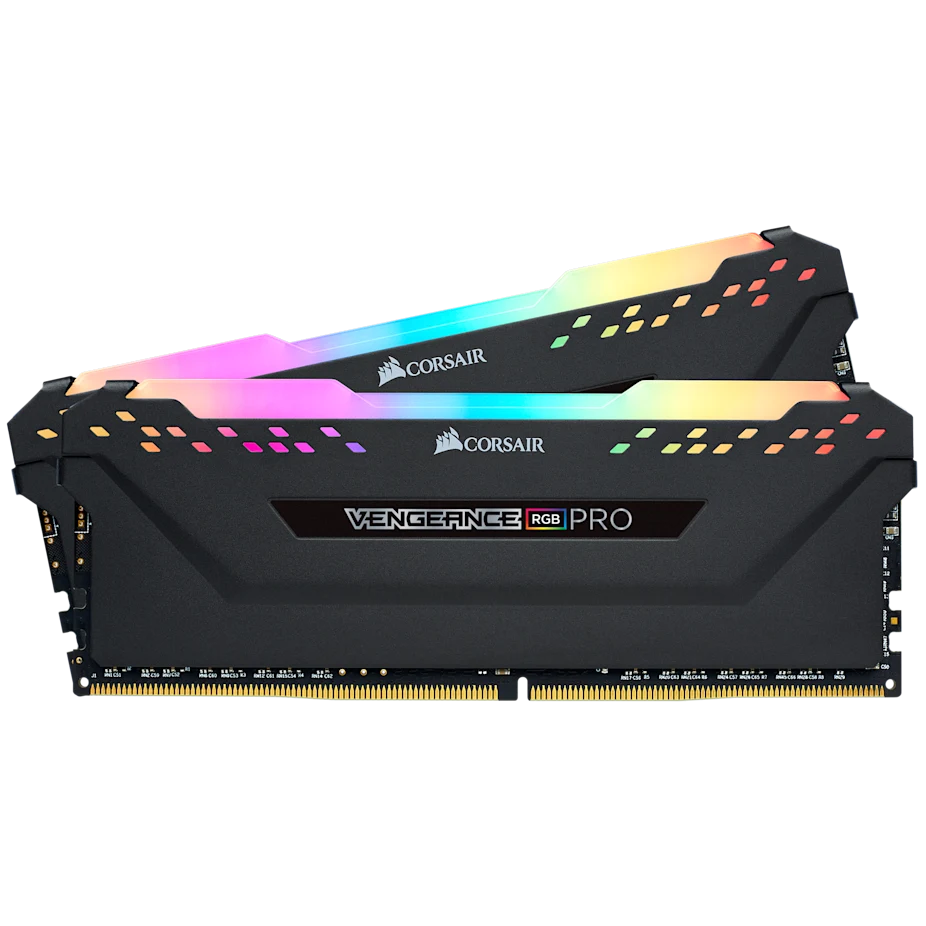
CORSAIR Vengeance RGB PRO DDR4 RAM 32GB
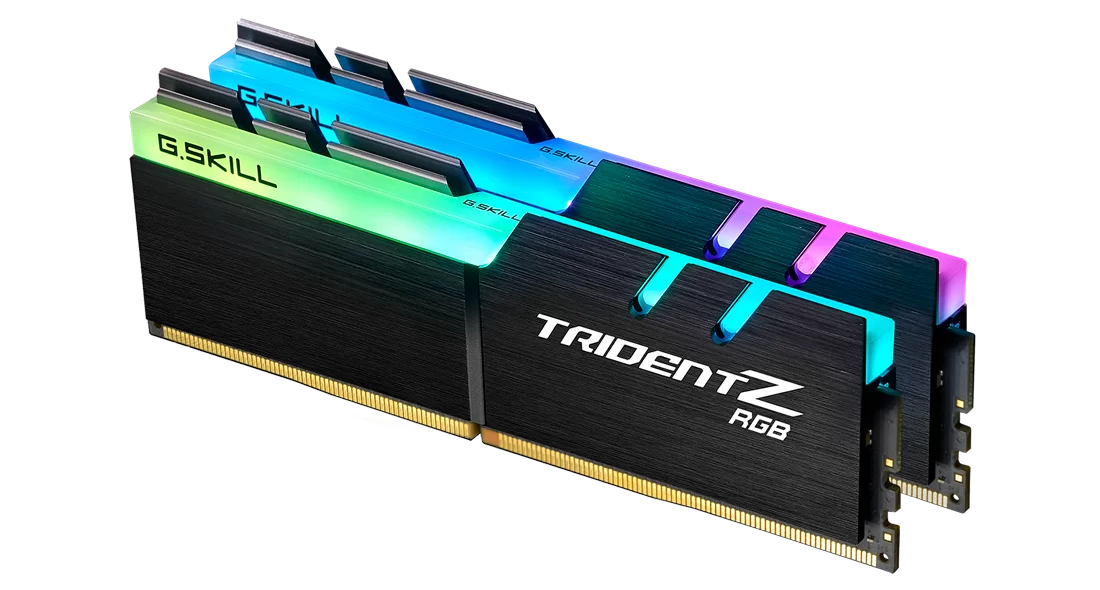
G.SKILL Trident Z RGB Series DDR4 RAM (XMP) 32GB
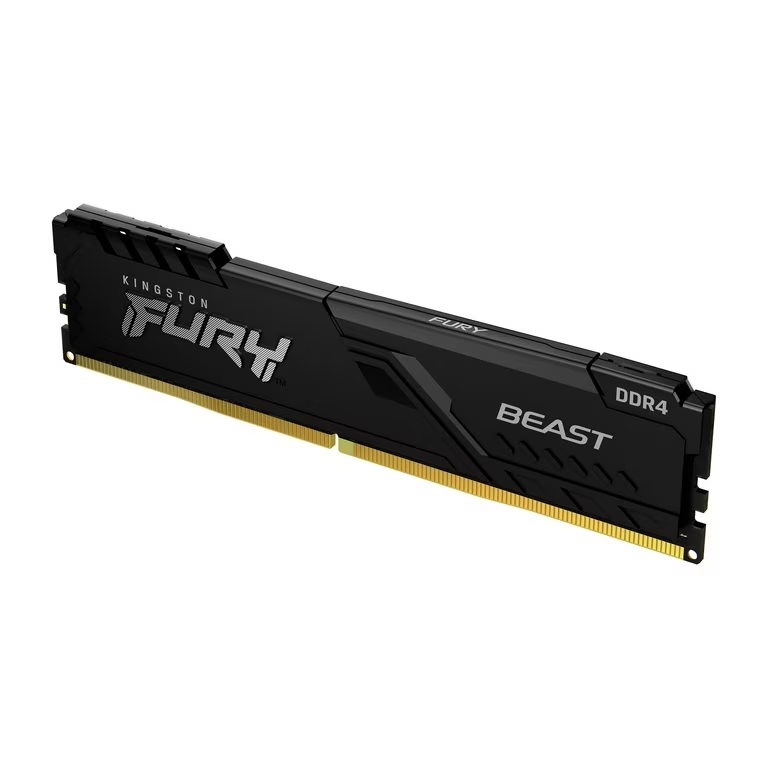
Kingston Fury Beast 32GB 3200MT/s DDR4 CL16 RAM
1. CORSAIR Vengeance RGB PRO DDR4 RAM 32GB (2x16GB) 3200MHz CL16-20-20-38 1.35V:

Why CORSAIR Vengeance RGB PRO Is a Strong RAM Choice for the Gigabyte Z390 AORUS Master?
Introduction:
When I was looking for the perfect RAM for the Gigabyte Z390 AORUS Master ATX LGA1151 motherboard, I wanted something powerful, reliable, visually stunning, and future-ready. After carefully analyzing performance, compatibility, speed, capacity, and design, I can confidently say that CORSAIR Vengeance RGB PRO DDR4 32GB (2×16GB) 3200MHz stands out as one of the best RAM kits you can pair with this motherboard.
Perfect Compatibility with Gigabyte Z390 AORUS Master:
One of the biggest reasons I trust this RAM is its excellent compatibility. The Gigabyte Z390 AORUS Master is designed for high-performance DDR4 memory, and CORSAIR Vengeance RGB PRO fits it flawlessly.
- Fully optimized for Intel Z390 chipsets
- Rock-solid stability on LGA1151 platforms
- Works seamlessly with XMP profiles for easy setup
On Z390 boards, the most important factor is a stable XMP profile and proven compatibility. A quality kit that runs cleanly at its rated settings helps avoid boot loops, memory training errors, and random crashes—particularly with 8th/9th-gen Intel CPUs on LGA1151.
DDR4 Advantage: Faster, Smarter, More Efficient:
This RAM uses DDR4 technology, which is a massive upgrade over DDR3. What I love about DDR4 is that it delivers:
- DDR4 is the required memory type for the Z390 AORUS Master,
- A good DDR4 kit improves real-world smoothness by reducing stutter during gaming,
- keeping background apps responsive,
- supporting higher sustained performance under load—especially once XMP is enabled.
On the Z390 AORUS Master, DDR4 really shines, unlocking the motherboard’s full potential.
32GB Capacity: A Huge Performance Boost:
For me, 32GB of RAM is a game-changer. Compared to 16GB, the difference is noticeable in demanding scenarios.
- Smooth high-end gaming without stutters
- Effortless 4K video editing and 3D rendering
- Flawless multitasking with many apps running at once
Even for users who don’t push their system daily, I see 32GB as future-proofing. It gives more headroom for background processes and large datasets, ensuring the system stays fast for years.
3200MHz Speed: The Sweet Spot:
I consider 3200MHz to be the perfect balance between performance, stability, and value — especially on Z390 motherboards.
- Faster than older 2400MHz or 2666MHz kits
- Noticeable gains in gaming and productivity
- Highly stable without the risks of extreme overclocking
On the Gigabyte Z390 AORUS Master, 3200MHz feels like the ideal speed, delivering smooth performance without unnecessary cost or instability.
Tight Timings for Snappy Performance:
With CL16-20-20-38 timings, this RAM delivers quick response times. I noticed faster loading, smoother gameplay, and better overall system responsiveness. These tight timings make a real difference, especially when paired with a high-end Intel CPU.
Premium Build Quality and Reliability:
CORSAIR doesn’t compromise on quality, and that’s obvious here.
- Custom high-performance PCB for clean signal quality
- Carefully screened ICs for stability and overclocking potential
- Long-term reliability even under heavy workloads
This makes it a perfect match for a premium motherboard like the Z390 AORUS Master.
Stunning RGB That Elevates the Build:
I’ll be honest — the RGB lighting is a big plus for me.
- 10 ultra-bright RGB LEDs per module
- Fully customizable through CORSAIR iCUE software
- Syncs beautifully with other CORSAIR RGB components
In a tempered-glass case, this RAM looks absolutely amazing and gives my build a high-end, professional appearance.
Excellent Overclocking Potential:
Thanks to tightly screened memory chips and a quality PCB, this RAM offers great overclocking headroom. Even if I don’t push it to the extreme, knowing the potential is there gives me confidence in its performance and stability.
Final Verdict:
I genuinely believe the CORSAIR Vengeance RGB PRO DDR4 32GB 3200MHz is one of the best RAM choices for the Gigabyte Z390 AORUS Master ATX LGA1151 motherboard.
It delivers the perfect combination of:
- Compatibility
- Speed
- Capacity
- Stability
- Premium build quality
- Eye-catching RGB design
For gamers, content creators, and power users alike, this RAM unlocks the true power of the Z390 platform — and that’s exactly why I rate it so highly.
CORSAIR Vengeance RGB PRO DDR4 RAM
The CORSAIR Vengeance RGB PRO DDR4 RAM 32GB (2×16GB) 3200MHz is a high-performance memory kit with fast speeds, tight timings, and vibrant RGB lighting, ideal for gaming, multitasking, and demanding desktop workloads. Its reliable build quality, strong compatibility with platforms like the Gigabyte Z390 AORUS Master, and customizable lighting make it a top choice for performance-focused PC builds.
✔ Pros
- 3200MHz with CL16 timings delivers smooth gaming, fast loading, and responsive multitasking.
- Works reliably with Gigabyte Z390 AORUS Master and other Intel Z390 / AMD 400, 500, X570 platforms.
- High 32GB capacity: Excellent for high-end gaming, 4K video editing, 3D rendering, and heavy multitasking; very future-proof.
- DDR4 runs at lower voltages (like 1.35V), which means less power draw and better efficiency, helping reduce heat and energy use.
- Custom performance PCB improves signal quality and long-term stability.
- Good overclocking headroom: Tightly screened ICs allow safe and stable memory tuning.
- 10 bright RGB LEDs per module with smooth effects and full iCUE synchronization.
- Consistent quality control and long lifespan.
- High-quality PCB ensures reliability and durability
✘ Cons
- More expensive than non-RGB kits: You pay extra mainly for aesthetics.
- Tall heat spreader design: Can cause clearance issues with large air CPU coolers.
- Requires iCUE software: RGB control depends on Corsair software, which some users find heavy.



2. G.SKILL Trident Z RGB Series DDR4 RAM (XMP) 32GB (2x16GB) 3600MT/s CL18-22-22-42 1.35V Intel AMD Desktop Computer Memory U-DIMM (F4-3600C18D-32GTZR):
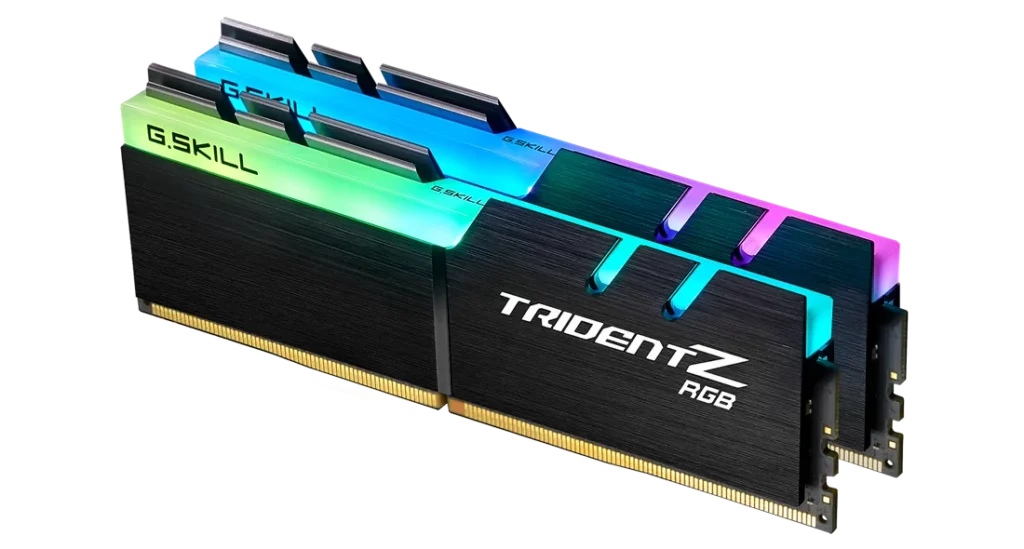
Why I Consider G.SKILL Trident Z RGB DDR4 32GB 3600MT/s One of the Best RAM Choices for the Gigabyte Z390 AORUS Master
Introduction – My Experience and First Impression:
When I was looking for high-performance RAM for the Gigabyte Z390 AORUS Master ATX LGA1151 motherboard, I wanted something fast, reliable, visually impressive, and future-proof. After researching and using the G.SKILL Trident Z RGB Series DDR4 32GB (2×16GB) 3600MT/s CL18, I can confidently say this RAM stands out as one of the best options for this motherboard. It perfectly balances speed, capacity, stability, and premium build quality—and it delivers exactly what a high-end Z390 system deserves.
Perfect DDR4 Match for the Z390 AORUS Master:
One of the main reasons I recommend this RAM is its DDR4 architecture, which is exactly what the Z390 chipset is designed for. Compared to older DDR3 memory, DDR4 offers higher bandwidth, better efficiency, and improved stability. Even though this kit runs at 1.35V with XMP, it remains power-efficient and well within safe limits for daily use and gaming. The Z390 AORUS Master handles this memory effortlessly, making it an ideal pairing.
32GB Capacity – Massive Headroom and True Future-Proofing:
For me, 32GB of RAM is a huge plus point. While 16GB is still fine for general use and light gaming, 32GB completely changes the experience for demanding workloads. I noticed smoother performance in high-end gaming, heavy multitasking, video editing, 3D rendering, and running multiple applications at once. There are no slowdowns, no memory bottlenecks, and plenty of headroom for background processes. This capacity also ensures my system stays relevant for years to come.
3600MT/s Speed – Faster Than 3200MT/s Where It Counts:
In my experience, 3600MT/s RAM is generally better than 3200MT/s, especially for CPU-intensive tasks and modern games. On the Z390 AORUS Master with an Intel LGA1151 CPU, this higher frequency improves overall system responsiveness, faster data access, and better minimum frame rates in some games. While casual users may not notice massive differences, enthusiasts and power users absolutely benefit—and the upgrade is well worth it if the price difference is small.
Intel XMP Support – Easy Performance Boost:
What I really appreciate is the Intel XMP profile. I simply enabled XMP in the BIOS, and the RAM instantly ran at its rated DDR4-3600 CL18-22-22-42 speed without manual tuning. This makes overclocking safe, simple, and stable—perfect for users who want maximum performance without complicated tweaking
Stability, Compatibility, and Reliability:
G.SKILL sells this RAM as a matched 2×16GB kit, which is extremely important. Using a matched kit ensures perfect synchronization and avoids instability issues that can occur when mixing different memory kits. This model is also widely compatible with Z390 boards, and G.SKILL’s QVL and configurator tools provide extra peace of mind. On the Z390 AORUS Master, stability has been rock-solid in my experience.
Premium Build Quality and Iconic RGB Design:
Let’s talk about looks—because this RAM looks amazing. The Trident Z RGB design is iconic, with a solid aluminum heat spreader and vibrant, smooth RGB lighting. It syncs beautifully with motherboard RGB software, and it gives my build a premium, high-end feel. The build quality feels robust and durable, which matches the premium reputation of both G.SKILL and the AORUS Master.
Excellent Choice for Gaming and Productivity:
From gaming to productivity, this RAM handles everything I throw at it. Games load faster, multitasking feels effortless, and demanding applications run smoothly. Whether I’m gaming, streaming, editing, or working with large files, this kit delivers consistent, high-level performance.
Final Verdict – Why I Highly Recommend It:
In my opinion, the G.SKILL Trident Z RGB DDR4 32GB 3600MT/s is one of the best RAM choices for the Gigabyte Z390 AORUS Master ATX LGA1151 motherboard. It offers the perfect combination of speed, capacity, efficiency, stability, and stunning design. For anyone building or upgrading a high-performance Z390 system, this RAM is a smart, powerful, and future-ready investment that I can confidently recommend.
G.SKILL Trident Z RGB Series DDR4 RAM
G.SKILL Trident Z RGB Series DDR4 RAM offers fast speeds, excellent stability, and high capacity, making it ideal for gaming, multitasking, and content creation. Its premium build quality and vibrant customizable RGB lighting add both performance and style to any high-end PC build.
✔ Pros
- High 32GB capacity – Excellent for high-end gaming, multitasking, 4K video editing, 3D rendering, and professional workloads;
- Delivers better performance than 3200MT/s in CPU-intensive tasks and gaming, making full use of high-end motherboards like the Gigabyte Z390 AORUS Master.
- DDR4 runs at lower voltages (like 1.35V), which means less power draw and better efficiency, helping reduce heat and energy use.
- It offers strong future-proofing compared to 16GB.
- Solid aluminum heat spreader ensures durability and good thermal performance.
- Stunning RGB lighting – Bright, customizable RGB that syncs nicely with motherboard and system lighting software.
- Matched dual-channel kit – 2×16GB modules are factory-matched for stability and consistent performance.
- G.SKILL is well known for quality memory and long-term stability.
✘ Cons
- Higher voltage at XMP (1.35V) – Slightly more power consumption than JEDEC 1.2V, though still completely safe.
- RGB adds cost – Users who don’t care about aesthetics may find non-RGB kits better value.
- Upgrading later requires buying another identical matched kit to avoid stability issues.
3. G.SKILL RipjawsV Series DDR4 RAM (XMP) 32GB (2x16GB) 3600MT/s CL18-22-22-42 1.35V Intel AMD Desktop Computer Memory U-DIMM – Black (F4-3600C18D-32GVK):
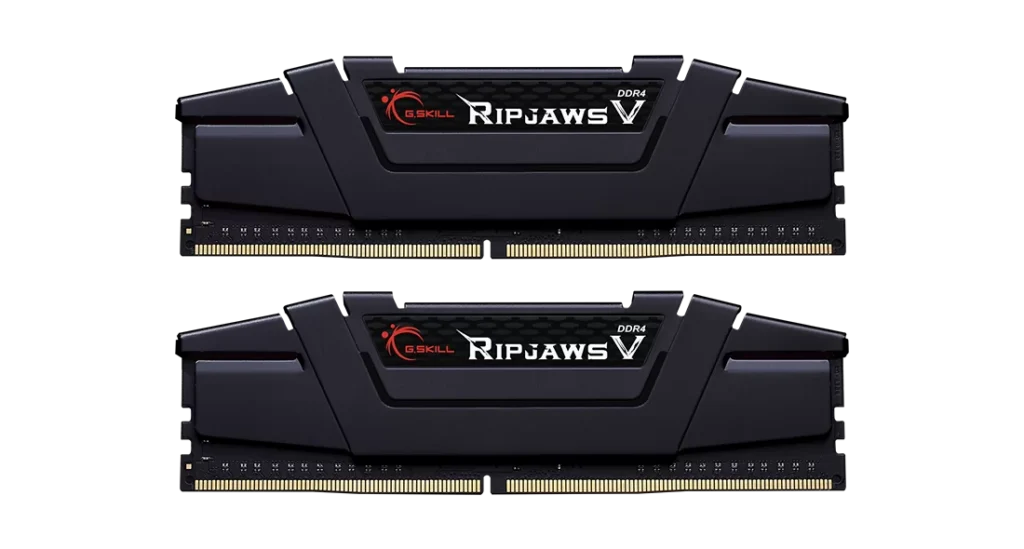
My Review: Why G.SKILL Ripjaws V 32GB DDR4-3600 CL18 Is the Best RAM for Gigabyte Z390 AORUS Master:
Introduction:
I chose the G.SKILL Ripjaws V Series DDR4 32GB (2×16GB) 3600MT/s CL18 for my Gigabyte Z390 AORUS Master ATX LGA1151 motherboard, and after using it, I can confidently say this RAM is one of the best matches for this platform. From compatibility to performance, reliability, and value, it checks every important box for a high-end Z390 build.
Perfect Compatibility with Z390 Platform:
One of the main reasons I consider this RAM ideal is its excellent compatibility with the Z390 chipset.The Gigabyte Z390 AORUS Master is designed to handle high-speed DDR4 memory, and this kit runs smoothly at 3600MT/s using Intel XMP without any issues.
With 8th and 9th Gen Intel CPUs (especially the i9-9900K), the board and this RAM work together flawlessly. Enabling XMP in the BIOS is simple, and the system boots stable at the rated speed.
Excellent Performance at 3600MT/s:
The 3600MT/s speed makes a noticeable difference compared to standard JEDEC memory. I experienced:
- Faster system responsiveness
- Better gaming performance (especially CPU-heavy games)
- Improved multitasking and workstation workload
The CL18-22-22-42 timings strike a great balance between speed and latency. While CL16 kits are slightly faster, the real-world difference is minimal, and this CL18 kit still delivers a strong performance boost.
Ideal Capacity for Gaming and Workstations:
The 32GB (2×16GB) configuration is perfect for the Z390 AORUS Master:
- Dual-channel setup works exactly as intended
- Plenty of headroom for modern games, streaming, editing, and productivity
- No memory bottlenecks even under heavy workloads
I never felt limited by RAM while gaming or multitasking.
Rock-Solid Stability and Reliability:
G.SKILL Ripjaws V is a trusted and well-tested series, and that reliability really shows here.
This kit is:
- Non-ECC DDR4 U-DIMM (ideal for desktops)
- Factory-matched to run together as a stable set
- Fully compliant with G.SKILL QVL and motherboard memory support lists
I experienced zero crashes, boot loops, or instability, even during long gaming sessions.
XMP Support Makes Setup Easy:
I really appreciate how Intel XMP makes everything simple:
- Just enable XMP in BIOS
- Memory automatically runs at 3600MT/s at 1.35V
- No manual tuning required
This is perfect for users who want high performance without complicated overclocking.
Great Value for Money:
In my opinion, this RAM offers excellent value:
- High frequency at a reasonable price
- Performance close to more expensive CL16 kits
- Better investment than slower 3000–3200MT/s memory
For a premium motherboard like the Z390 AORUS Master, this kit feels like the sweet spot.
Clean Design That Fits Any Build:
The black Ripjaws V heat spreaders look clean and professional:
- No unnecessary RGB
- Fits easily under large air coolers
- Matches the aesthetic of the Z390 AORUS Master perfectly
It’s ideal if you prefer performance over flashy lighting.
Why I Recommend This RAM for Gigabyte Z390 AORUS Master
I believe this RAM is one of the best choices because:
- Fully supports Z390 and Intel 8th/9th Gen CPUs
- Runs stable at 3600MT/s via XMP
- Strong value for its price
- Proven reliability from G.SKILL
- Excellent gaming and workstation performance
Final Verdict:
From my experience, the G.SKILL Ripjaws V 32GB DDR4-3600 CL18 (F4-3600C18D-32GVK) is an ideal and well-balanced RAM kit for the Gigabyte Z390 AORUS Master. It maximizes what the motherboard is capable of, delivers stable high-speed performance, and offers outstanding value.
G.SKILL RipjawsV Series DDR4 RAM (XMP) 32GB
The G.SKILL Ripjaws V Series DDR4 32GB (2×16GB) 3600MT/s memory kit offers fast, reliable performance with Intel XMP support, making it ideal for gaming and multitasking. Its high speed and solid build quality provide excellent value for desktop PC upgrades.
✔ Pros
- Works extremely well with Gigabyte Z390 AORUS Master and other Z390 boards, fully supporting DDR4-3600 via Intel XMP with 8th/9th Gen Intel CPUs (including i9-9900K).
- High Memory Speed (3600MT/s) offers a major performance upgrade over JEDEC default speeds, improving gaming performance, multitasking, and overall system responsiveness.
- Intel XMP profile runs reliably at rated speed and voltage (1.35V) without manual tuning, making setup simple and user-friendly.
- 2×16GB dual-channel configuration is perfect for modern gaming, streaming, content creation, and workstation workloads.
- G.SKILL Ripjaws V is a well-tested and trusted memory series with strong long-term stability and wide motherboard QVL support.
- Black heat spreaders fit easily under large air coolers and match most professional or gaming PC builds.
- Factory-paired modules ensure consistent performance and reduce the risk of instability.
✘ Cons
- Slightly slower than CL16 kits at the same frequency, though the real-world difference is minimal for most users.
- Lacks RGB, which may be a downside for users who prefer flashy aesthetics.
- Runs at lower JEDEC speeds by default; users must enable XMP in BIOS to achieve 3600MT/s.
- Not Ideal for Extreme Overclockers
4. CORSAIR Vengeance LPX DDR4 RAM 32GB (2x16GB) 3200MHz CL16-20-20-38 1.35V Intel AMD Desktop Computer Memory – Black (CMK32GX4M2E3200C16):
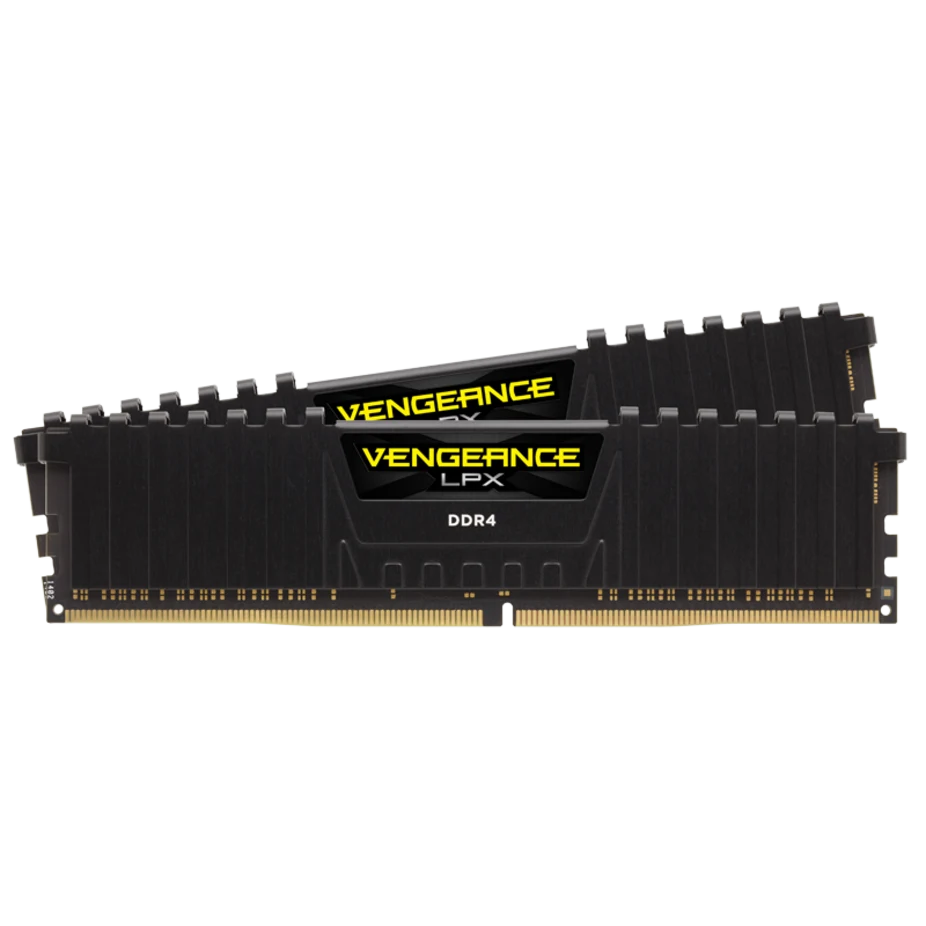
My Review: Why CORSAIR Vengeance LPX 32GB 3200MHz CL16 Is the Best RAM for Gigabyte Z390 AORUS MASTER
Introduction:
I chose the CORSAIR Vengeance LPX DDR4 32GB (2x16GB) 3200MHz CL16 for my Gigabyte Z390 AORUS MASTER (ATX, LGA1151), and after using it, I can confidently say this RAM is one of the safest, most stable, and most compatible choices for this motherboard. From performance to clearance and long-term reliability, it checks every box I care about.
Rock-Solid Compatibility with Z390:
One of the biggest reasons I picked this RAM is its excellent compatibility with Z390 motherboards. CORSAIR is known for extensive motherboard testing, and this kit works flawlessly on the Z390 AORUS MASTER.
I had zero boot issues, no memory errors, and no instability — it just works straight out of the box.
Perfect Performance for 9th Gen Intel CPUs:
For Intel 8th and 9th Gen processors, 3200MHz CL16 is the sweet spot, and this RAM hits it perfectly.I get smooth gaming performance, faster load times, and great responsiveness in multitasking and productivity tasks. The latency and frequency balance is ideal for the Z390 platform without pushing the memory controller too hard.
Easy XMP Setup – No Hassle:
I really appreciate the XMP 2.0 support.With just one click in the BIOS, the RAM automatically runs at 3200MHz with CL16-20-20-38 timings at 1.35V. No manual tuning, no voltage guessing, and no random crashes — just fast and stable performance.
Excellent Stability and Reliability:
This kit uses hand-sorted and individually screened memory ICs, which gives me confidence in long-term stability. Even under heavy gaming sessions and multitasking, the RAM stays consistent and reliable.For a motherboard like the Z390 AORUS MASTER that’s built for stability and power delivery, this RAM is a perfect match.
Low-Profile Design = Zero Clearance Issues:
The 34mm low-profile height is a huge plus.I use a large air cooler, and the Vengeance LPX fits without any clearance problems. This makes it ideal not just for full ATX builds, but also for tighter setups where tall RGB RAM would be a headache.
Efficient Aluminum Heat Spreader:
The solid aluminum heat spreader does a great job of pulling heat away from the memory chips.Even during extended gaming or stress testing, the RAM stays cool, which helps maintain stability and protects performance over time.
High-Quality PCB and Overclocking Headroom:
The custom high-performance PCB ensures strong signal quality and consistent voltage delivery.While I mainly run it at XMP speeds, knowing that there’s extra overclocking headroom gives me peace of mind if I ever want to push performance further.
Ideal 32GB Capacity for Modern Use:
The 32GB (2x16GB) dual-channel configuration is perfect for modern gaming, streaming, content creation, and heavy multitasking.Using a matched kit instead of mixing RAM ensures optimal dual-channel performance and avoids compatibility issues on the Z390 platform.
Clean Look That Matches Any Build:
I like the simple black, non-RGB design. It looks clean, professional, and fits perfectly with the premium aesthetic of the Z390 AORUS MASTER. Sometimes, reliability matters more than flashy lighting — and this RAM proves that.
Final Verdict:
I consider the CORSAIR Vengeance LPX 32GB 3200MHz CL16 one of the best RAM choices for the Gigabyte Z390 AORUS MASTER.It offers outstanding compatibility, excellent performance for Intel LGA1151 systems, rock-solid stability, easy XMP setup, and a low-profile design that fits any cooler.
CORSAIR Vengeance LPX DDR4 RAM 32GB
The CORSAIR Vengeance LPX DDR4 32GB (2x16GB) 3200MHz CL16 is a reliable and high‑performance memory kit with solid stability and wide motherboard compatibility. Its low‑profile design and easy XMP setup make it ideal for gaming, multitasking, and productivity builds.
✔ Pros
- Works flawlessly with the Gigabyte Z390 AORUS MASTER and other Intel 300/400/500-series boards, with very high success rates out of the box.
- 3200MHz with CL16 timings is the sweet spot for 8th and 9th Gen Intel CPUs, delivering smooth gaming, fast application response, and consistent system stability.
- XMP profile loads perfectly in BIOS, automatically setting correct speed, timings, and voltage without manual tweaking.
- Hand-sorted and individually screened ICs combined with a high-performance PCB ensure long-term reliability and reduced risk of memory errors.
- Ideal for large air coolers and compact builds—no RAM clearance issues on the Z390 AORUS MASTER.
- Solid aluminum heat spreaders keep temperatures under control during heavy workloads and extended gaming sessions.
- Dual-Channel 2x16GB Configuration provides optimal bandwidth and stability compared to single-stick or mixed RAM kits.
- Perfect for users who prefer a professional or stealth build without unnecessary lighting.
- While excellent at stock XMP settings, it also allows light overclocking thanks to quality ICs and PCB design.
✘ Cons
- Overclocking headroom is decent but not as high as premium B-die or higher-bin memory kits.
- Not suitable for users who want visual flair or RGB synchronization in their build.
- Some advanced users may prefer more aggressive factory-tuned timings or lower-voltage kits.
5. Kingston Fury Beast 32GB 3200MT/s DDR4 CL16 Desktop Memory Single Module KF432C16BB/32

My Review: Why the Kingston Fury Beast 32GB DDR4-3200 CL16 Is the Best RAM for the Gigabyte Z390 AORUS Master
Introduction:
I chose the Kingston Fury Beast 32GB DDR4-3200 CL16 (KF432C16BB/32) for my Gigabyte Z390 AORUS Master ATX LGA1151 motherboard, and after using it, I can confidently say this RAM is one of the best possible matches for this platform. It delivers the right balance of speed, stability, capacity, and future-proofing without unnecessary cost or compatibility headaches.
Perfect DDR4 Speed for Z390:
The Z390 chipset works best with high-quality DDR4 memory in the 3000–3600 MT/s range, and 3200 MT/s is a proven sweet spot.
- I get noticeably better responsiveness compared to JEDEC speeds (2400–2666 MT/s).
- Gaming, multitasking, and content creation all feel smoother.
- The Z390 AORUS Master fully supports DDR4-3200 via XMP, so there are no limitations here.
This RAM runs exactly where the motherboard performs most efficiently.
Low Latency CL16 = Real-World Performance:
The CL16 (16-20-20) timings are ideal for this platform.
- Lower latency means faster data access.
- Games benefit from improved minimum FPS and reduced stutter.
- System responsiveness feels snappier during heavy multitasking.
From my experience, CL16 at 3200 MT/s offers a better real-world balance than higher-clocked but looser-timed kits.
Rock-Solid Intel XMP 2.0 Support:
One of the biggest reasons I trust this RAM on the Z390 AORUS Master is Intel XMP 2.0.
- I simply enabled XMP in the BIOS.
- The motherboard automatically set the correct frequency, voltage (1.35 V), and timings.
- No manual tuning, no instability, no boot issues.
The Z390 AORUS Master has an excellent BIOS, and this RAM works flawlessly with it.
Excellent Compatibility with Z390 Memory Topology:
The 2Rx8 dual-rank design works very well with Gigabyte’s high-end memory traces.
- Stable operation at rated speed.
- No random crashes or memory training issues.
- Ideal for Intel 8th and 9th Gen CPUs (i7-8700K, i9-9900K, etc.).
I didn’t need a BIOS update, but even older BIOS versions handle this module reliably.
32GB Capacity: Ideal for Modern Workloads:
With 32GB in a single DIMM, I get both performance and flexibility.
- Perfect for video editing, 3D work, and heavy browser usage.
- Plenty of RAM for modern games, streaming, editing, and multitasking.
- Leaves another slot free to upgrade to 64GB later.
This makes it a smart long-term investment for the Z390 platform.
Single-Module Advantage with Upgrade Freedom:
Using a 1 × 32GB stick gives me flexibility.
- I can add another identical 32GB stick later for full dual-channel 64GB.
- No wasted DIMM slots.
- Easy future upgrade without replacing existing RAM.
For builders planning ahead, this is a big win.
Low-Profile Heat Spreader = Zero Clearance Issues:
The low-profile Fury Beast heat spreader fits perfectly on the Z390 AORUS Master.
- No interference with large air coolers.
- Excellent airflow around the DIMM slots.
- Clean, minimal design that matches the AORUS aesthetic.
Thermals stay stable even under heavy loads.
Voltage and Stability Confidence:
At 1.35 V, this RAM runs cool and stable.
- Well within safe limits for DDR4.
- No long-term reliability concerns.
- Kingston’s binning quality really shows here.
I’ve experienced zero instability during gaming or stress testing.
Lifetime Warranty and Kingston Reliability:
Kingston’s limited lifetime warranty gives me peace of mind.
- Proven brand reputation.
- Excellent long-term reliability.
- Ideal for a high-end motherboard like the Z390 AORUS Master.
This RAM feels like a “set it and forget it” component.
Real-World Experience on the Z390 AORUS Master:
In daily use, I noticed:
- Faster boot times.
- Smoother multitasking
- Stable gaming performance
- Zero compatibility issues
Everything works exactly as expected on this motherboard.
Final Verdict:
I consider the Kingston Fury Beast 32GB DDR4-3200 CL16 one of the best RAM choices for the Gigabyte Z390 AORUS Master.
- Perfect speed for Z390
- Low-latency CL16 performance
- Flawless Intel XMP support
- Excellent stability and compatibility
- Upgrade-friendly single-module design
- Trusted Kingston quality and warranty
If you’re running a Z390 AORUS Master with an Intel 8th or 9th Gen CPU, this RAM is a smart, reliable, and future-proof choice that fully complements the motherboard’s capabilities.
Kingston Fury Beast 32GB 3200MT/s DDR4 CL16 RAM
The Kingston Fury Beast 32GB DDR4‑3200 CL16 (KF432C16BB/32) is a high‑capacity RAM module delivering solid gaming, multitasking, and productivity performance with its 3200 MT/s speed and low latency. Its XMP‑ready profile and reliable build make it a strong choice for modern Intel and AMD desktop systems.
✔ Pros
- 3200 MT/s with CL16 offers an excellent balance of speed and latency.
- Ideal for gaming, multitasking, and content creation on DDR4 platforms.
- Noticeable improvement over JEDEC default speeds when XMP is enabled.
- Fully compatible with Intel Z390 boards, including the Gigabyte Z390 AORUS Master.
- Intel XMP 2.0 support makes setup simple and reliable.
- Also works well on AMD Ryzen platforms.
- Reduces stuttering and slowdowns in memory-intensive tasks.
- Plenty of headroom for modern games, heavy multitasking, video editing, and 3D workloads.
- Upgrade Flexibility: Single-module design leaves room to add another identical stick later for 64GB dual-channel operation.
- Dual-Rank (2Rx8) Design: Often delivers slightly better memory throughput on Intel platforms.
- Easy Setup: Simply enable XMP in BIOS to reach rated speed—no manual tuning needed.
- Low-Profile Heat Spreader: No clearance issues with large air coolers; helps maintain stable thermals.
- Kingston quality with a limited lifetime warranty ensures long-term peace of mind.
✘ Cons
- Single-Channel by Default: One stick runs in single-channel mode; best performance requires adding a second matching module.
- No RGB Lighting
- Limited Overclocking Headroom: Focused on stability rather than extreme overclocking beyond 3200 MT/s.
- Possible BIOS Update on Older Boards: Some older systems may need a BIOS update to fully support high-density 32GB DIMMs.
6. TeAMGROUP T-Create TTCED432G32G3200HC16FDC01 Expert Overclocking 10L DDR4 32GB 3200MHz (PC4 25600) CL16 Desktop RAM Memory Module:
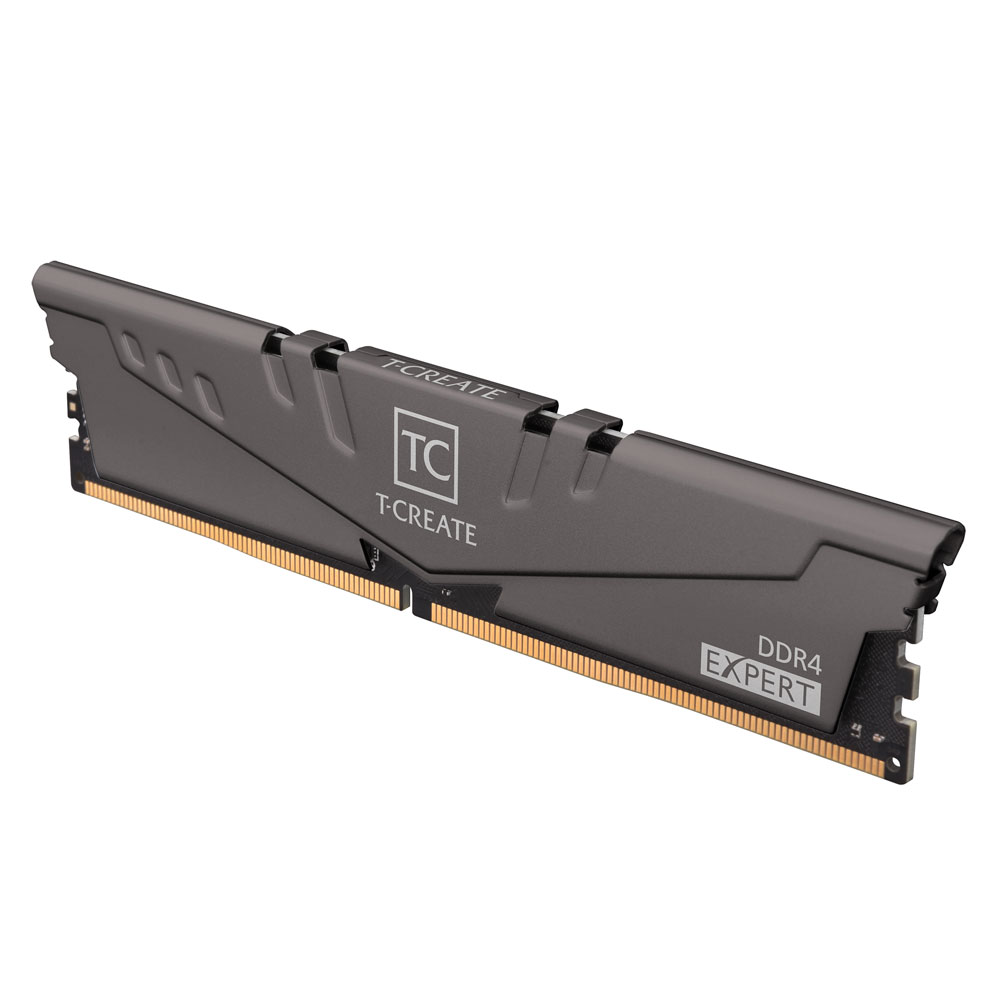
My Review: Why the TEAMGROUP T-Create Expert 32GB Is the Best RAM for Gigabyte Z390 AORUS MASTER
Introduction:
I chose the TEAMGROUP T-Create Expert 32GB (2x16GB) DDR4 CL16 because I wanted a memory kit that delivers stability, performance, and long-term reliability on my Gigabyte Z390 AORUS MASTER ATX LGA1151 motherboard. After using and evaluating it, I can confidently say this RAM fits the Z390 platform perfectly and excels where it actually matters.
Perfect Match for Z390 & 9th Gen Intel CPUs:
One of the biggest reasons I consider this RAM ideal is how well 3200MHz CL16 pairs with Intel 8th and 9th Gen processors on Z390 boards.
In my experience, this speed is the sweet spot—fast enough to unlock strong performance while remaining extremely stable. The Z390 AORUS MASTER handles this memory effortlessly with XMP enabled.
Excellent Stability Thanks to 10-Layer PCB:
Stability is a top priority for me, especially for long gaming sessions and heavy workloads.This RAM uses a 10-layer PCB, which significantly improves signal integrity and reduces electrical interference. On the Z390 AORUS MASTER, this translates into rock-solid performance with zero random crashes or memory errors.
Ideal Capacity for Gaming, Multitasking & Content Creation:
With 32GB (2x16GB), I never feel limited.Whether I’m gaming, multitasking, editing, or running demanding applications, this RAM handles everything smoothly. Dual-channel operation works perfectly on the Z390 platform, fully utilizing the motherboard’s memory controller.
Optimized Timings: CL16 Matters:
CL16 at 3200MHz is an excellent balance of low latency and high bandwidth.I noticed faster load times, smoother gameplay, and better responsiveness compared to higher-latency kits. This timing profile is especially well-suited for the Z390 chipset, which benefits more from tighter timings than extreme frequencies.
Plug-and-Play Reliability (JEDEC-Friendly):
What I really appreciate is that this RAM doesn’t force aggressive or unstable overclocks.It follows JEDEC-friendly standards, making it highly compatible and easy to run on the Z390 AORUS MASTER. Just enable XMP in BIOS, and it works flawlessly—no tweaking needed.
Strong Overclocking Potential (Optional):
Even though I prioritize stability, it’s nice knowing this RAM still has headroom for overclocking.Thanks to its high-quality components and board design, the Z390 AORUS MASTER can push this memory further if needed—though at stock XMP, it already performs excellently.
Professional, Clean Design:
The T-Create Expert series has a clean, minimalist look that fits perfectly with the premium aesthetic of the Z390 AORUS MASTER.No flashy RGB—just a professional design focused on performance and cooling, which I personally prefer.
Long-Term Confidence with Lifetime Warranty:
TEAMGROUP backs this RAM with a lifetime warranty, which gives me peace of mind.For a system I plan to use long-term, this matters a lot. It reinforces my confidence in both the build quality and reliability of this kit.
Final Verdict
I believe the TEAMGROUP T-Create Expert 32GB DDR4 3200MHz CL16 is one of the best RAM choices for the Gigabyte Z390 AORUS MASTER because it delivers:
- Perfect speed and timings for Z390
- Exceptional stability with a 10-layer PCB
- Ideal 32GB capacity for modern workloads
- Easy compatibility and plug-and-play setup
- Clean design and lifetime warranty
For me, this RAM strikes the perfect balance between performance, stability, and reliability, making it an outstanding match for the Z390 AORUS MASTER motherboard.
TEAMGROUP T-Create Expert 32GB (2x16GB) DDR4 CL16
The TEAMGROUP T-Create Expert 32GB DDR4 3200MHz CL16 RAM offers stable, high-performance memory with a 10-layer PCB and optimized timings ideal for gaming and multitasking. Its robust build and lifetime warranty make it a reliable choice for desktop systems like the Z390 AORUS MASTER.
✔ Pros
- Perfect speed for Z390 platform – 3200MHz CL16 is the sweet spot for Gigabyte Z390 AORUS MASTER and 8th/9th Gen Intel CPUs, offering excellent performance without instability.
- High stability with 10-layer PCB – The professional 10-layer board design reduces signal interference and improves long-term reliability..
- Large 32GB capacity (2x16GB) – Ideal for gaming, heavy multitasking, content creation, and professional workloads.
- Low latency CL16 timings – Delivers fast responsiveness and better real-world performance compared to higher-latency kits.
- Excellent compatibility – JEDEC-friendly design makes it easy to run with XMP enabled; works smoothly on Z390 boards (QVL check recommended).
- Good overclocking headroom – While stable at stock XMP, it still offers room for tuning on high-end motherboards like the AORUS MASTER.
- Clean, professional design – Minimalist look with no RGB, matching the premium and serious aesthetic of the Z390 AORUS MASTER.
- High-quality components – Uses customized high-temperature-resistant capacitors for durability.
- Lifetime warranty – Strong peace of mind for long-term system use.
- Over-clocking
✘ Cons
- Not the highest frequency available – 3600MHz kits can offer slightly better performance, though gains on Z390 are usually small.
- No RGB lighting – Not ideal for users who prefer flashy, RGB-heavy builds.
- QVL should still be checked – Compatibility can depend on BIOS version and CPU IMC quality.
How to Install RAM & Enable XMP (Z390 AORUS Master)
- Install two sticks in A2 and B2 (the recommended dual-channel slots).
- Boot into BIOS and enable XMP Profile 1.
- If your system fails to boot, clear CMOS, then try a lower frequency (e.g., 3200) or update BIOS.
FAQ
Q1: What RAM speed is best for Z390 AORUS Master?
For most users, DDR4-3200 is the best balance of stability and performance. DDR4-3600 can be great if your system remains stable with XMP enabled.
Q2: Is 32GB worth it on Z390?
Yes—32GB (2×16GB) is ideal for modern gaming, heavy browser use, streaming, and productivity.
Q3: Should I use 2 sticks or 4 sticks?
Use 2 sticks for easier memory training and better stability at higher speeds.
Q4: Does CAS latency matter (CL16 vs CL18)?
Yes—lower latency helps responsiveness. CL16 at 3200 is a strong sweet spot; CL18 at 3600 is still very good.
Q5: Do I need to update BIOS for new RAM?
Often not, but BIOS updates improve memory compatibility and stability—especially with higher-speed kits.
Conclusion
The Gigabyte Z390 AORUS Master performs best with a high-quality dual-channel DDR4 kit that has a stable XMP profile and sensible timings. For most builds, the safest and best-value choice is 32GB (2×16GB) DDR4-3200 CL16, because it delivers strong performance while remaining easy to run on LGA1151 systems. If you want a bit more speed and your CPU memory controller + BIOS can handle it, 32GB DDR4-3600 CL18 can provide a measurable uplift in some games and CPU-heavy workloads.
Whichever kit you choose, prioritize compatibility (QVL where possible), correct slot placement (A2/B2), and stable XMP settings. That combination gives you the smoothest gaming experience and long-term reliability on the Z390 platform.



![Does CPU affect FPS? [Solved]](https://pcexplorers.com/wp-content/uploads/2025/05/image-15-150x150.png "Does CPU affect FPS? [Solved] 71")